Assets Gadgets release notes — July 2026
The My Assets portal now speaks 26 languages, unconfigured portals greet users with a helpful preview instead of a bare warning, and admins can clear the setup.
This release is all about the people on the other side of the portal: the My Assets view in the Jira Service Management portal now speaks your customers' language — 26 of them — and greets them with something helpful even before an admin has set anything up.
My Assets in 26 languages
The entire My Assets portal experience is now localized — the first localization in the app. Tables and their empty states, the detail panel (Quick actions, Summary, Your reported tickets, Related assets, Asset timeline), search, the Table/Cards switch, the Overview tab, buttons, loading and error messages.
The language follows each user's own Atlassian language setting automatically — no configuration needed. Supported: English (US & UK), German, French, Spanish, Italian, Portuguese (Brazil & Portugal), Dutch, Danish, Norwegian, Swedish, Finnish, Icelandic, Estonian, Polish, Czech, Slovak, Hungarian, Romanian, Turkish, Russian, Japanese, Korean, and Chinese (Simplified & Traditional).
A few things intentionally stay as they are: content your admins typed in (table names, KPI labels, chart titles) and the attribute values coming from your Assets schema are your texts — the app doesn't translate customer data. The admin area and dashboard gadgets remain English for now; they're used almost exclusively by administrators, and portal customers came first.
NOTE: English, German and Russian have been reviewed by humans; the remaining languages are machine-translated to a good baseline and will be refined over time. Spotted an awkward phrase in your language? Tell us via support — that feedback goes straight into the next release.
A helpful welcome instead of a bare warning
Until now, a portal customer opening My Assets before it was configured hit a terse "Not configured" — and someone whose account simply doesn't have access to any table saw an equally unhelpful "No assets found."
Both cases now show a proper explanation screen: what My Assets is, why it's currently empty, and — depending on the situation — what happens next. It includes a visual preview of a configured portal (tabs, search, KPI cards, an assets table, the detail panel and a chart), so users immediately understand what the page will offer once it's live.
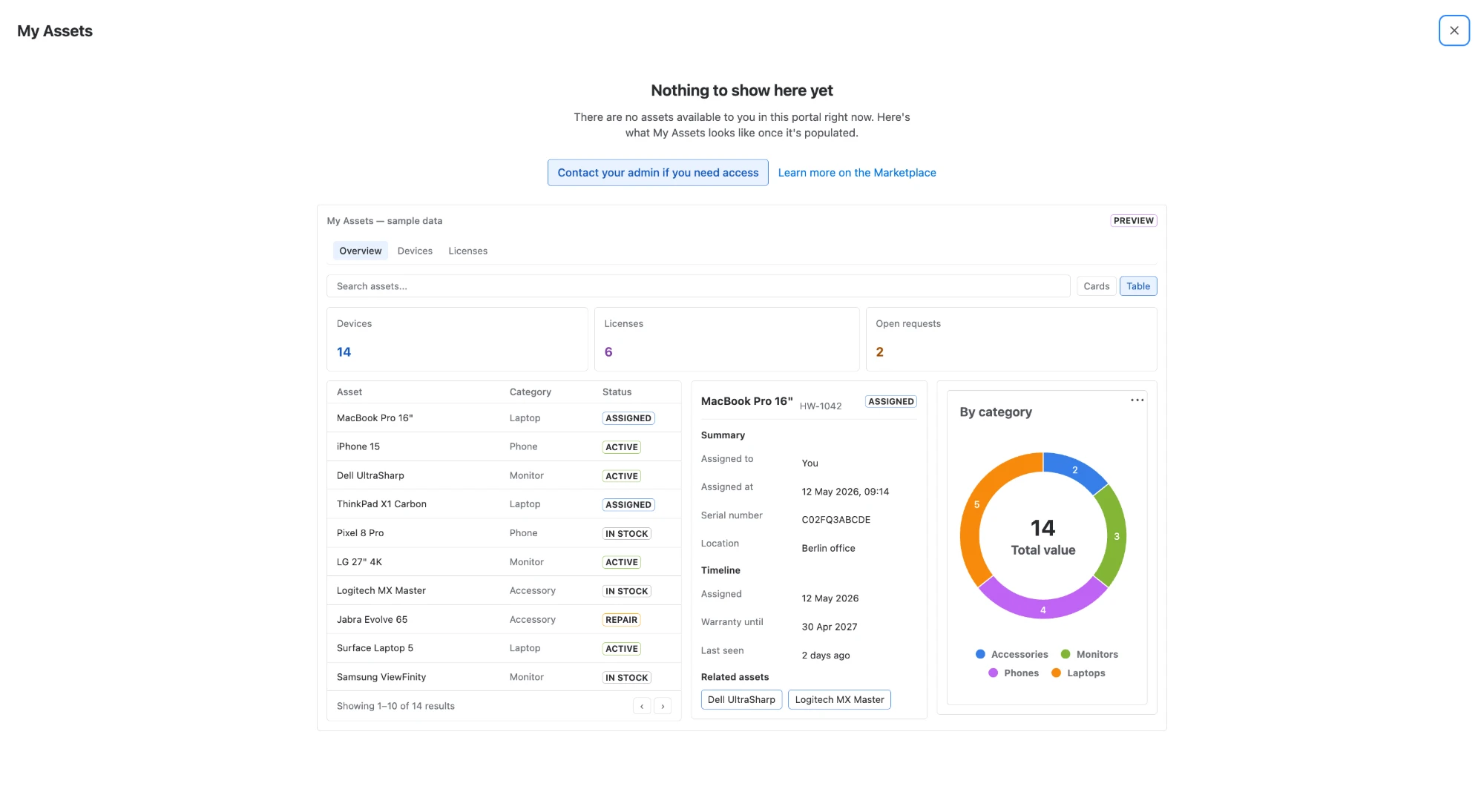
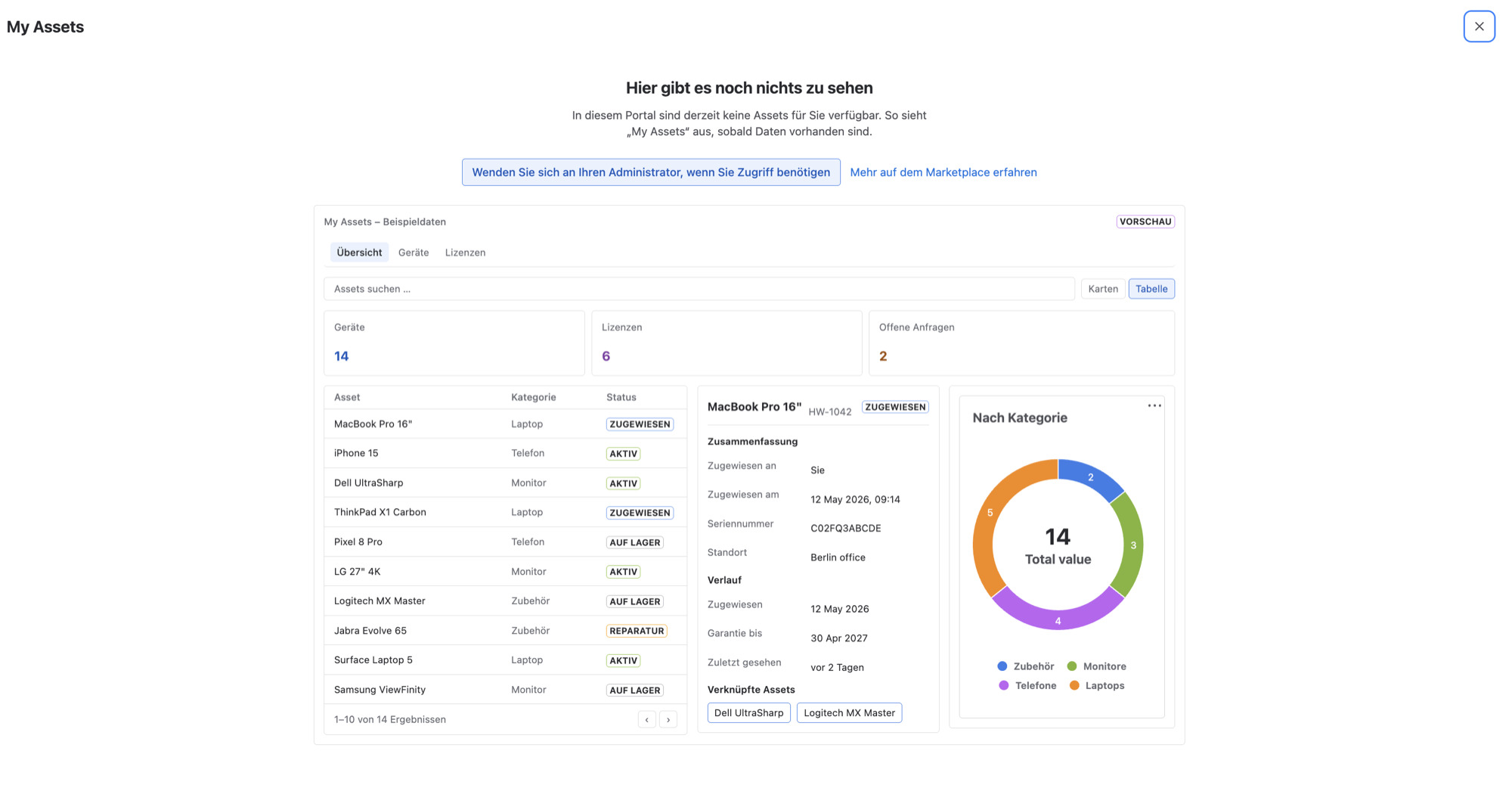
The welcome screen explains the situation, offers a next step, and previews a configured portal — in the user's own language
The preview is built entirely from clearly-labeled sample data — no real assets are loaded or shown, and nothing from your site leaves it.
Fixed: clearing the portal configuration
Admins could add portal tables but never remove the last one — the settings page refused to save an empty configuration, even though the app itself handles "no tables" perfectly well. Removing all tables and saving now works. A hint above the save button explains the consequence: saving without tables hides My Assets from portal customers, who will see the new welcome screen instead.
FAQ
Which languages does the My Assets portal in Assets Gadgets support?
All 26 languages available on the Atlassian platform — from English, German, French and Spanish through the Nordic and Central European languages to Japanese, Korean and Chinese. The portal follows each user's own Atlassian language setting automatically.
How do I change the language my customers see in My Assets?
You don't have to do anything — each portal user sees My Assets in the language set in their own Atlassian profile. There is no per-portal language switch to configure.
Why are some Assets Gadgets texts still in English?
Texts your admins typed (table names, KPI labels, chart titles) and attribute values from your Assets schema are your own content — the app never rewrites it. The admin area and dashboard gadgets are also still English; portal customers were the priority for this first localization round.
Does the My Assets welcome screen preview show our real assets?
No. The preview is assembled from clearly-labeled sample data — no resolvers run and no real asset data is loaded for it.
Try it in your portal
Open your JSM portal as a customer and switch your Atlassian profile to another language — My Assets follows along. And if you haven't configured the portal yet, your customers now get a proper introduction instead of a dead end.