How to Document Jira Automation Rules Without Writing a Thousand Descriptions
Rule (flow) names like "Copy of copy of SLA v2" survive the people who wrote them. Here is how to get a readable description onto every rule without writing a thousand of them by hand.
Ask an admin what a rule does and you get the name. The name is often Copy of copy of SLA v2. The person who wrote it left in 2023, the ticket that justified it is closed, and the only real documentation of a Jira automation rule (Jira now calls them flows) is the rule itself — a tree of triggers, branches and smart values that takes ten minutes to read and does not fit in a sentence.
That is fine for one rule. It is not fine for nine hundred, and it is why nobody dares delete anything.
Why the name is never enough
A rule's name is written once, at creation, by someone who knows exactly what they meant. Everything after that — the extra condition, the second branch, the field that got renamed — happens without the name changing. After two years the name describes the original intent, not the current behaviour, and there is no field in Jira that holds the difference.
So the knowledge lives in three places, all of them bad: someone's memory, a Confluence page that stopped being updated, or the rule's own JSON.
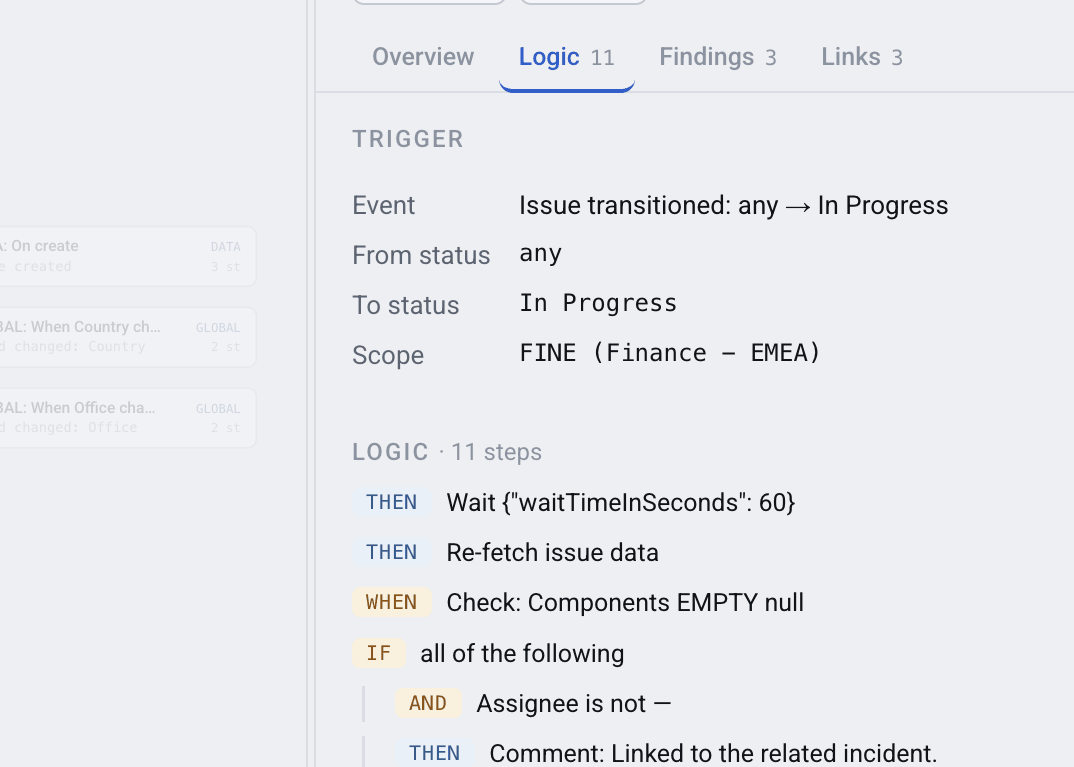
What the rule actually does, in one screen
Step one: make the rule readable
Before writing a description, you have to be able to read the rule. Automation Map renders each rule as a tree — trigger at the top, conditions and branches indented under it, actions at the leaves, smart values resolved to the fields they touch. What took ten minutes of clicking through Jira's editor becomes one screen.
That alone answers most questions. For the rest, you need the description.
Step two: let AI write the first draft
Writing nine hundred descriptions by hand is not going to happen. Describing one rule, though, is exactly the kind of task a language model is good at: the input is structured, the output is two sentences of plain English, and a human can check it in five seconds.
Automation Map ships a Rovo agent — on every edition, Basic included — that reads a rule's structure and writes one or two sentences on why the rule exists, what it keeps in order and for whom; if the intent is not clear it asks the rule's owner instead of guessing. The agent saves them marked as AI-written, and the map badges them "AI". A description a person wrote — in the rule in Jira or in the app — is never overwritten. Nothing is written back into Jira: the description lives in the app's own knowledge base next to the rule.
Ask the agent to "document space X" and it writes a full page to a fixed template; it creates the Confluence page only after you say yes.
NOTE: Descriptions are stored by the app, not in Jira. The app works from an export of your rules that an admin uploads, and it has no permission to change anything in Jira. A description is a note about a rule, never a change to it.
Step three: ask questions instead of reading rules
Once rules have descriptions, the question changes shape. Instead of "let me open eleven rules and see which one sets this field", you ask.
The same Rovo agent answers from the indexed structure:
- "Who fills in the Due Date on PROJ issues?" — the rules that write that field, each with a link to the map and to the rule in Jira
- "Do we have two rules doing the same thing?" — rules that start on the same trigger and run the same actions, found by searching the logic, plus the "Copy of …" clones the map already links
- "What happens when a bug is created in PROJ?" — every rule that wakes up on that event, in one answer
Each rule it names comes with two links: one to its place on the map, one to the rule in Jira for editing.
What it cannot tell you
Anything about actual runs. How often a rule fired is in Jira's Performance insights; what a run did is in the audit log, kept for 90 days. There is no public API for the audit log, and the app reads neither. Questions of that shape get an answer grounded in structure plus an honest note that Jira has the rest.
And nothing goes to a model until a Jira administrator switches AI on — and then only for the spaces (projects) they pick. The Rovo agent runs on your own Rovo, not through the app's AI switch.
FAQ
How do I document Jira automation rules (flows) at scale?
Read each rule as a structure rather than as JSON, then let an AI agent draft a business description from that structure and approve it. Automation Map does both; the descriptions are stored in the app, next to the rule.
Does the AI write descriptions back into my Jira rules?
No. The app works from an uploaded export and has no permission to change anything in Jira. Descriptions live in the app's knowledge base; your rules in Jira are untouched.
What is the Rovo agent for?
Two things: drafting a description for a rule from its structure, and answering questions about your rules in plain language — who writes a field, which rules react to an event, which rules look like duplicates.
Can it tell me when a rule last ran?
No. Run history lives in Jira's automation audit log, which Atlassian does not expose through an API. Any tool claiming otherwise is guessing. Structural questions it answers exactly; timing questions it sends you to the audit log for.
Which edition includes AI descriptions?
Describing and documenting rules through the Rovo agent works in every edition, Basic included. Advanced and Enterprise add descriptions the app writes itself with a model, for the spaces an admin picks, once an admin switches AI on.
Do I need Rovo for this to be useful?
No. The map and the readable rule view work on their own. Rovo adds the conversational layer for people who would rather ask than browse.
Make the next admin's job possible
The rules will outlive the people who wrote them either way. The only choice is whether they outlive the explanation too.
👉 Automation Map for Jira — read, describe and search your rules