A rule stopped working. Nothing errored. Nobody knows why.
For Jira administrators who inherited somebody else’s automation
Upload one export from Jira. A minute later you see which rule sets off which, which hand-offs are switched off, which rules race for one event, where a credential sits in a rule — and what one run costs in steps before billing starts on 3 December.
On one real Jira site, one pass through the enabled rules costs 5,443 billable steps, and 505 of them could be removed. Above your plan’s allowance, from 3 December, that is a line on an invoice. The same site carries 1,724 hand-offs that can never fire — most were never meant to chain, and some were built on purpose and are quietly not working.
Jira Cloud · Built on Atlassian Forge · It never changes anything in Jira
Export the rules from Jira, upload the file, and a site of a thousand rules is mapped in about a minute. Nothing to install on a server, nothing to configure, and no API token at all on the Marketplace editions.
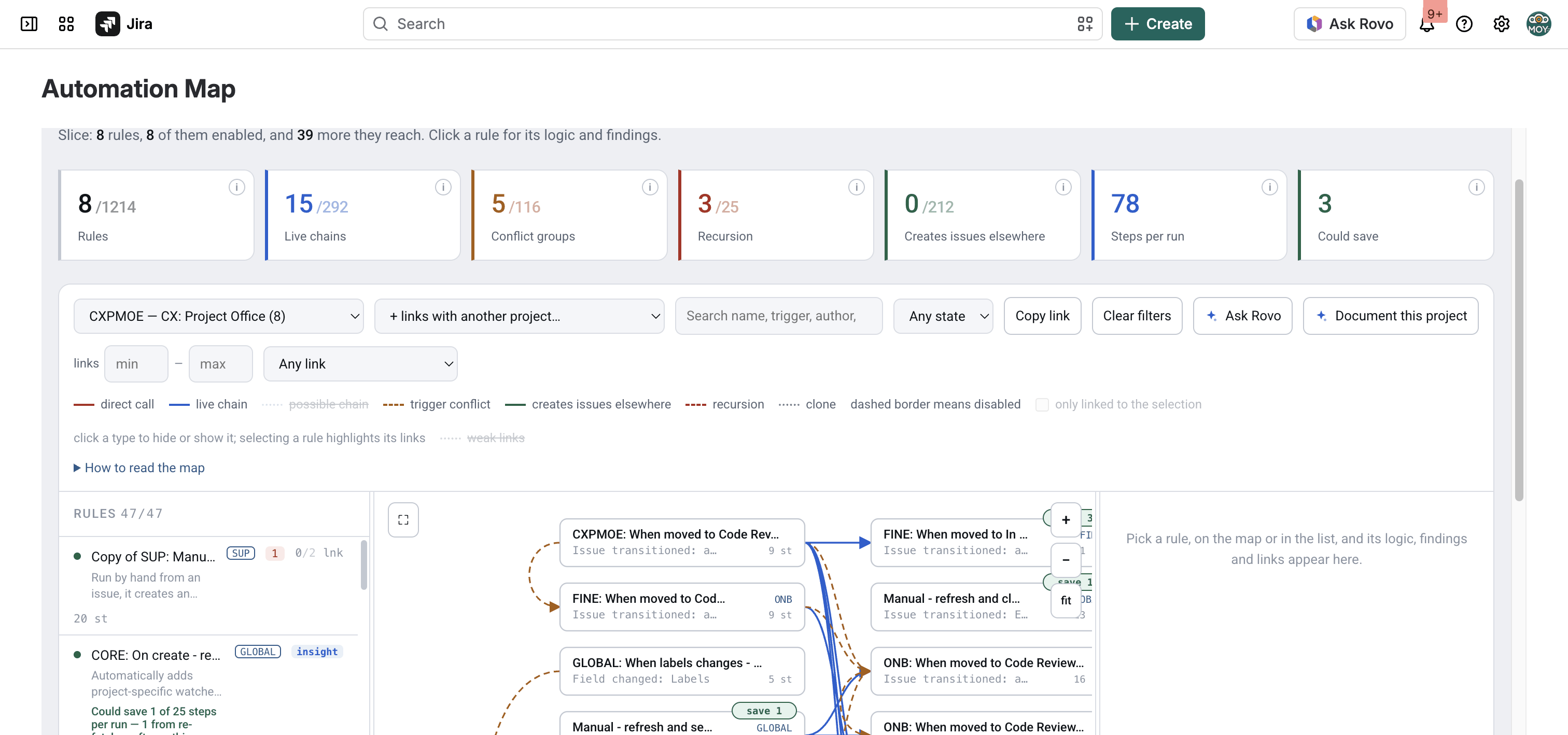
The map of one project. Every screenshot on this page is taken on an anonymised demo site of 1,214 rules — every project, status, field, person and rule name replaced, so no customer’s data is shown anywhere on this site.
505 billable steps a fix would remove — in one pass, on one site
- 1,214 automation rules (in 98 projects — 884 switched on, 330 off)
- 293 chains that actually fire
- 1,724 pairs that could chain but do not (the receiver has Allow rule trigger off — 216 rules, and that switch is off by default)
- 116 groups of rules racing on one event
- 184 links where a rule creates work items in another team’s project (from 95 rules, disabled ones included)
- 25 recursions (21 self-loops, 4 rings)
- 5,443 steps for one run of every enabled rule
- 505 of those steps removable (on 225 rules — about 9%)
Step billing starts on 3 December 2026. Until then the waste is untidy; after it, every run pays for it — on this site, 505 steps of it in a single pass through the rules.
Every figure here is read by the app from one real Jira Cloud site — an export of 22 September 2026, step counts included, and none of it estimated. The same site also carries 46 cloned rules. One site, not an average: a second would give eight different numbers.
The same arithmetic, on your rule count
The site above spends 5,443 steps on one run of every enabled rule, and 505 of those could be removed — about one step in eleven. Put your own rule count in and the page applies the same ratio. Nothing more clever than that.
On the page this is a field you type your own rule count into. At 900 rules it works out as 5,542 steps per run across the instance, 514 of them removable.
If your site runs above its plan’s allowance, those 514 removable steps cost about $0.26 per pass through your rules — times how often they fire, which only your audit log knows.
This assumes your rules are built like that site’s, and they will not be exactly: the ratio comes from one instance, and a tidier or messier set moves it either way. Treat the result as the shape of the answer, not the answer.
And it is steps per run — not a monthly bill. Atlassian publishes no API for how often a rule actually fires, so nobody, including this app, can turn one into the other for you.
Six things a Jira administrator says sooner or later
- A rule stopped working and nobody knows why — nothing errored, it just never ran.
- Automation is billed per step from December and we have no idea what we run.
- “Can we turn this one off?” — and nobody can say what stops downstream if you do.
- An issue gets commented twice and no two people agree on which rule is doing it.
- Somebody put an API token in a rule, and it is still sitting in the configuration.
- “Copy of Copy of…”, and the people who wrote them have left.
None of these is visible from Jira's automation screen, because that screen shows you a list of rules and this is a problem about the relationships between rules. That is the gap this app fills, and the only one it claims to.
What it does
One upload answers three questions nobody can answer from inside Jira: what fires what, what races what, and what one run costs.
Every rule of a project, and every line between them
Rules are boxes, relationships are lines. You see which rule sets off which, which of those hand-offs cannot fire, where two rules race for the same event, and what creates issues in other projects. A dashed border means the rule is disabled.
The chain you built, and the switch that stops it
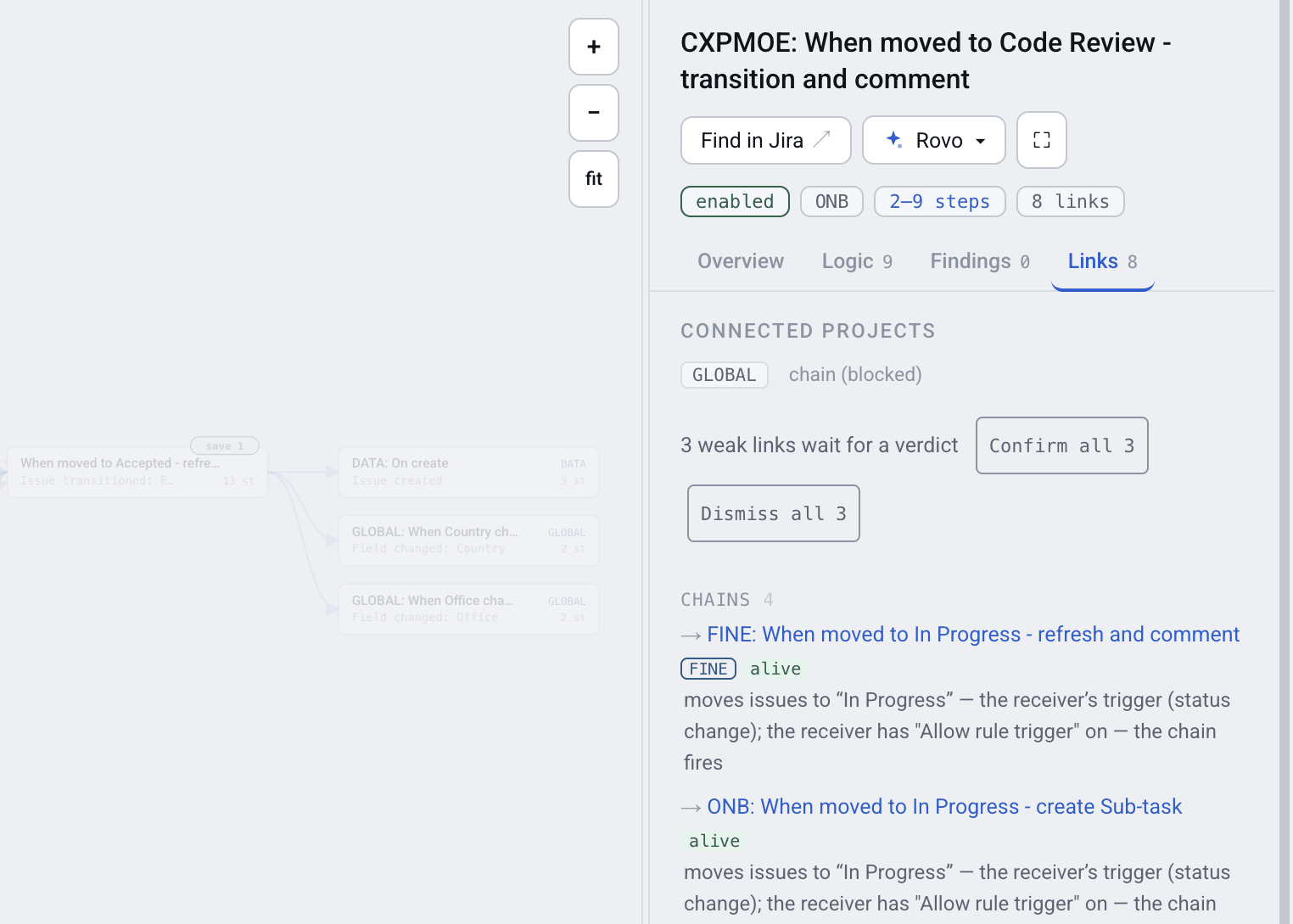
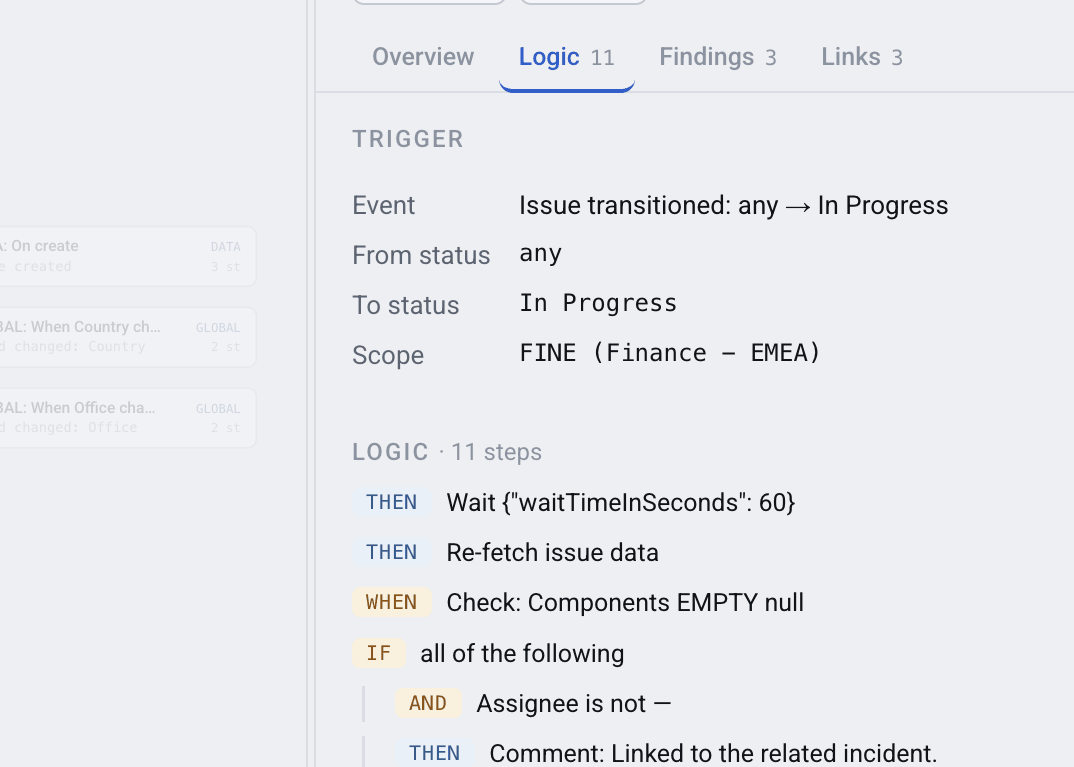
Open a rule and its Links tab separates chains that fire from chains that are blocked, each with the reason in plain words — normally that the receiving rule has Allow rule trigger switched off, so it does not react to changes made by automation.
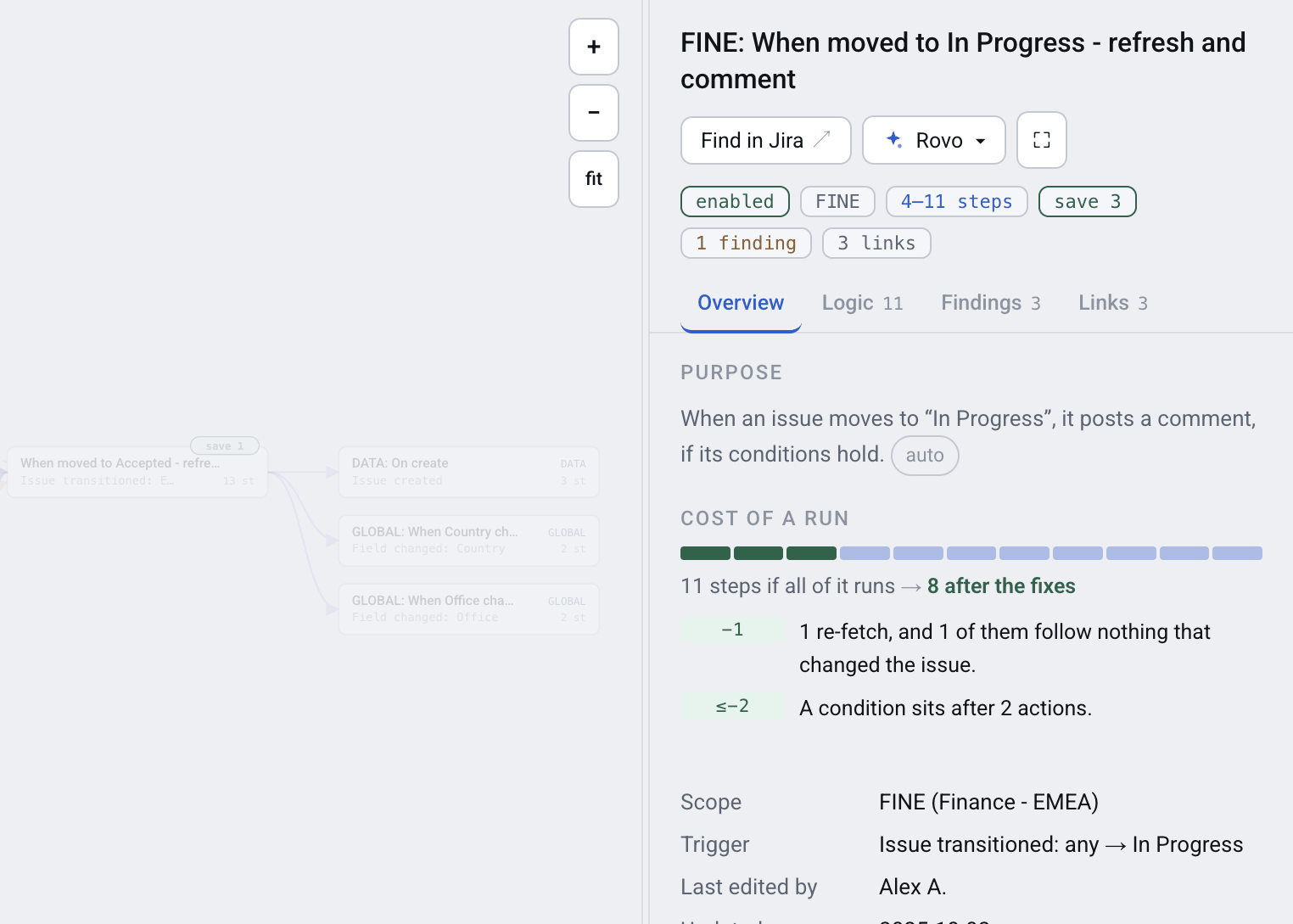
Steps per run, and what could be removed
Each rule shows the steps one run spends and which of thirteen detectors found waste — a log action billed on every run, a re-fetch after nothing changed, a schedule that rescans every issue, conditions paid for too late. Each finding says how many steps the fix saves.
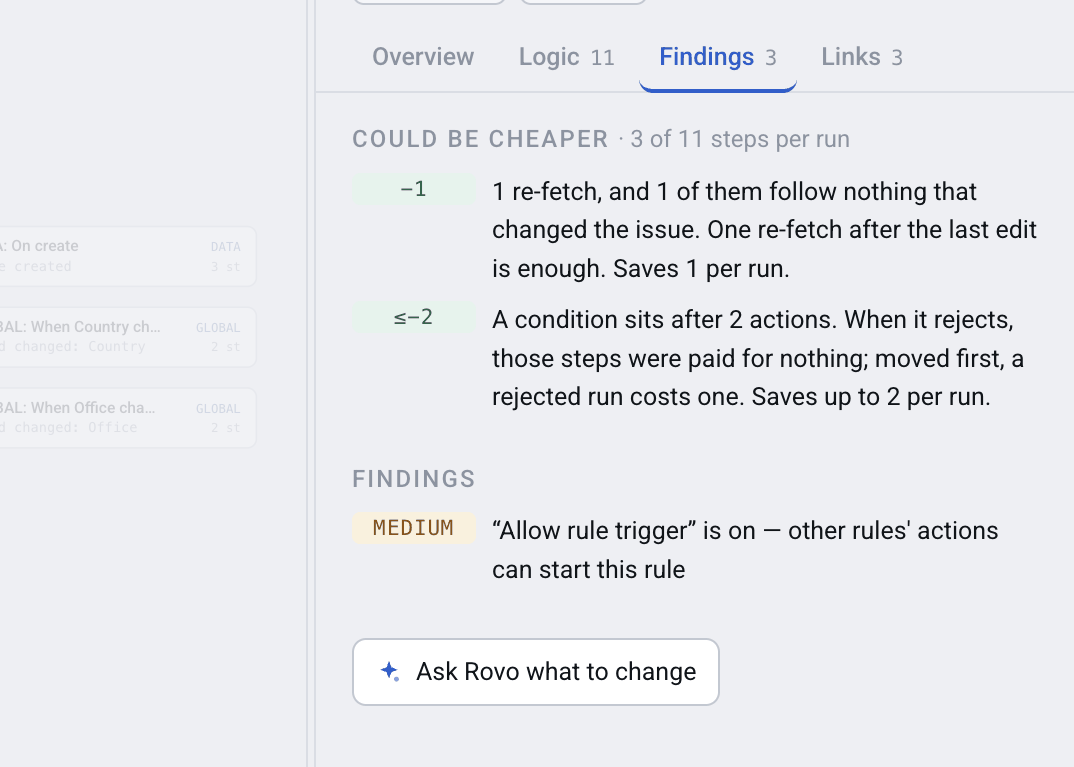
What one rule does wrong, with the fix spelled out
The Findings tab is not a score. It names the thing — this log action is a billed step on every run; this scheduled run walks every issue its JQL matches — and tells you what to change in Jira. You make the change; the app never touches your rules.
The whole rule as a tree, with ids resolved to names
Trigger, conditions and actions as a tree you can read without opening Jira, every field, status and issue type named rather than numbered, and anything that looks like a credential masked before it was ever stored.
What stops on our side if that team changes their rules
Pick two projects and the map shows only what crosses between them. Cross-project writes are their own link type, so the rules that quietly create or edit issues in somebody else's project stop being invisible.
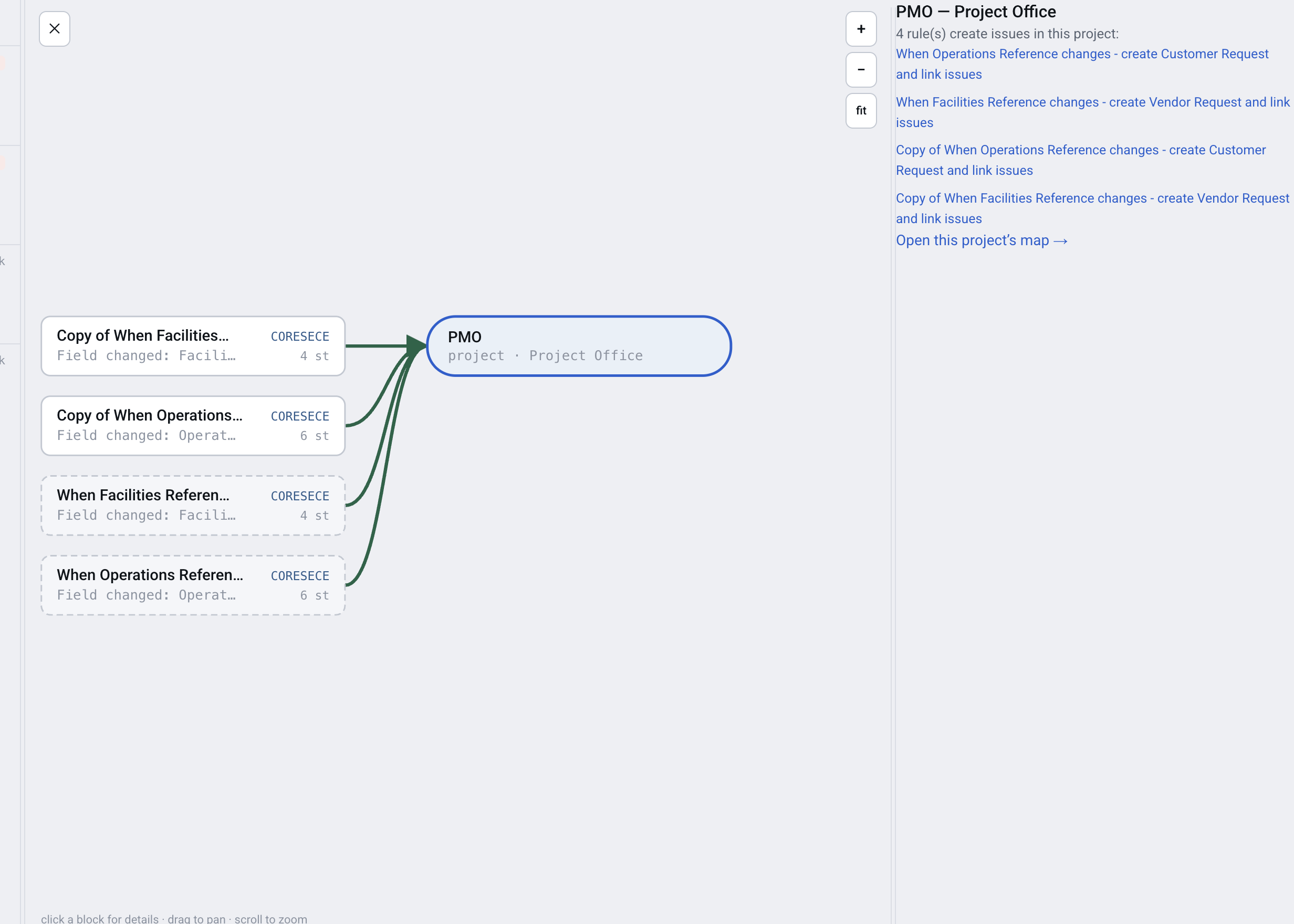
How to read the map: direct call — one rule's action sets off another; live chain — the hand-off really fires; blocked chain — the receiver has Allow rule trigger off — nothing happens; trigger conflict — two rules race for the same event; creates issues elsewhere — the rule creates issues in another project; recursion — the chain comes back to where it started; clone — the same rule, twice.
The audit page, and the Rovo agent
One page over the whole site: the same findings the rule cards carry, gathered by class, ranked, filtered and exportable to CSV — the document an audit or a clean-up works from. The Rovo agent answers from the same map, on every edition. The audit page itself is on Advanced and Enterprise.
Compared with not buying anything at all
Doing nothing
The rules keep accreting. Nobody decides to stop understanding their automation — it happens one rule at a time, and the December step billing arrives on an instance nobody has measured.
Working it out by hand
Reading the exported rule JSON, one rule at a time. The catch is not that it is slow: the relationships are not in there to be read. A rule exported on its own carries none of its links — which rule sets it off, and which rule it sets off, simply are not in the file. That is a fact about the export format, and it is the honest reason a tool has to exist at all.
Jira's own automation screen
It lists every rule, it is free, and it is already open in your other tab. What it does not do is show the rules in relation to each other — which is the entire question this page is about.
Where Jira's own tooling is the right answer, not this
If the question is what actually happened on this issue yesterday — did the rule run, what did it do, why did it fail — then Jira's automation audit log is the correct tool and this app cannot replace it. Atlassian exposes no API for run history, so nothing built outside Jira can. Automation Map reads how your rules are built, not the record of what they did.
Basic, Advanced or Enterprise — which one you need
Basic and Advanced are the two editions of the Marketplace app. Enterprise is a different app, distributed privately. The difference that matters most is how the rules get into the app; almost everything else follows from that.
| Basic (Marketplace) | Advanced (Marketplace) | Enterprise | |
|---|---|---|---|
| How you get it | Marketplace, self-serve, free trial | Marketplace, self-serve, free trial | Private installation link, sold directly |
| Billing | Through Atlassian | Through Atlassian | Direct, annual term |
| Getting the rules in | |||
| How rules reach the app | You export from Jira and upload the file | You export from Jira and upload the file | The app reads your site by itself, with an API token |
| Automatic scheduled refresh | No — the Automation API does not accept Forge apps | No — the Automation API does not accept Forge apps | Yes, on a schedule you set |
| How often you can refresh | 7 loads in a rolling week | 5 loads in a rolling day | Unlimited |
| Data counts as stale after | 8 days | 2 days | Whatever the schedule sets |
| What you get | |||
| The map, rule cards, relations, blocked hand-offs, trigger conflicts | Yes | Yes | Yes |
| Findings on each rule, including a credential found inside a rule | Yes | Yes | Yes |
| Step cost of each rule, and what to remove | Yes | Yes | Yes |
| Every rule's cost as one list, sorted by what it could save, with CSV | No | Yes | Yes |
| Rovo agent and MCP server | Yes | Yes | Yes |
| Audit page — every finding ranked and filtered, CSV exports | No | Yes | Yes |
| AI rule descriptions, insights, the scope picker | No | Yes | Yes |
| Custom field catalogue — which field to use, which duplicates are abandoned | No | No | Yes |
| Field contexts and their values — “does ACME already exist, and where do I add it” | No | No | Yes |
| Capabilities the Marketplace will not approve | No | No | Yes — two of them are in this table already |
| The fine print | |||
| Runs on Atlassian | Yes | Yes | No — it must call the Jira Automation API, which is egress |
| Permissions it asks for | Read-only Jira scopes | Read-only Jira scopes | Also manage:jira-configuration — read-only in practice; the app never writes configuration |
Basic and Advanced are priced per user per month through Atlassian, with a free trial; the prices will be on the Marketplace listing. Enterprise is an annual term, quoted directly.
Most buyers should start on the Marketplace, not Enterprise
The Marketplace editions run entirely on Atlassian, ask only for read-only scopes, and the map they build is the same map. Enterprise is for sites where uploading an export by hand is not acceptable — a large instance whose rules change daily, or an audit obligation that needs the map to refresh without a person.
Why the Enterprise edition cannot carry the Runs on Atlassian badge: reading your rules automatically means calling the Jira Automation API, and that API does not accept Forge apps. The call has to be made with an API token from outside Atlassian, which counts as egress. That is the whole trade — convenience for the badge — and it is the row we would rather you read here than discover at installation.
And Basic is not a crippled tier
Basic is the whole map, every relationship, every finding on the rule it belongs to, the step costs and the Rovo agent. What Advanced adds is the work the product does for you: those same findings gathered into one ranked, filterable, exportable document; a model writing what each rule is for; the model's reading of whole groups of rules — a chain, a race on one event, a duplicate; and room to reload five times a day rather than seven times a week.
Tell me when it is on the Marketplace
If Basic or Advanced is the right answer for your site, there is nothing to buy yet: the listing is still going through Atlassian's approval. The form on this page takes an e-mail address and nothing else, and sends one message on the day the listing goes live.
Security and trust
- It never changes anything in Jira — Not a rule, not an issue, not a field, not a configuration. It reads and reports.
- Built on Atlassian Forge — Everything it derives is stored in Forge hosted storage inside your own Atlassian site.
- No e-mail addresses are stored — The app keeps the display name of whoever created or last edited a rule, and nothing else about a person.
- Credentials are masked, and never gated — A credential found inside one of your rules is masked before anything is stored, and the finding is shown on every edition, Basic included — never behind a plan.
We hold no SOC 2 report, no ISO 27001 certificate and no other certification, and we are not going to imply one. The full detail is in the Data Security and Privacy Statement.
The questions administrators actually type
How much will Jira automation cost after the December 2026 change?
From 3 December 2026 Atlassian bills automation by the step — the trigger and every condition, action, branch and loop turn that ran — at $0.50 per 1,000 steps above your plan’s allowance. Automation Map counts what one run of each rule costs and what could be removed. It cannot estimate your monthly bill: Atlassian exposes no API for how often a rule ran, so the app never forecasts.
Why did my Jira automation rule stop working?
The most common cause the app finds is a hand-off that cannot fire: rule A's action would set off rule B, but rule B has Allow rule trigger switched off, so the chain never happens and nothing reports an error. Jira ships that switch off, so the app shows the pair and names the switch rather than calling it broken — you confirm which chains you actually built.
Why does my Jira automation run twice, or add two comments?
Two or more rules react to the same event in the same place, and Jira does not guarantee which one runs first. Automation Map calls these trigger conflicts, groups the rules involved, and shows them on the map in orange so you can see exactly which rules are racing.
Can I see which automation rules write into other projects?
Yes — cross-project writes are drawn as their own link type, and picking two projects shows only what crosses between them. It answers the question every admin eventually asks: what stops working on our side if that other team changes their rules?
Shorter questions, before you ask us
How do I find which Jira automation rules use a field?
Ask by field name and the app lists every rule that reads or writes it, and whether the match was in the trigger, a condition or an action. It searches the rule text the way a person would read it, with ids already resolved to names. On every edition, including Basic.
Is there an audit tool for Jira automation rules?
The audit page lists every finding across the site: credentials written into rules, hand-offs that cannot fire, racing triggers, rules that send data outside Jira, throwaway and stale rules, loops, cost savings and naming problems. Each class exports to CSV, and a credential finding comes with a security ticket ready to paste. The audit page is on Advanced and Enterprise; the findings themselves, including a credential found inside a rule, are on every edition.
Does Automation Map change anything in Jira?
No. It reads and reports. It has never written a rule, an issue, a field or a configuration, and it will not. Every link it offers into Jira opens Jira's own editor, where you make the change yourself.
Which edition should I buy — Basic, Advanced or Enterprise?
Start on the Marketplace. Basic is the whole map, every relationship, the findings on each rule, the step costs and the Rovo agent. Advanced adds four things: the audit page, with every finding ranked, filterable and exportable; AI descriptions; AI insights across groups of rules; and five loads a day rather than seven a week. Enterprise is for sites where uploading an export by hand is not acceptable.
How do rules get into the Marketplace editions?
You export the rules from Jira's Automation screen and upload the file to the app, and the map is built in the background. Basic allows 7 loads in a rolling week and counts the data stale after 8 days; Advanced allows 5 loads in a rolling day and 2 days. The Enterprise edition reads your site by itself, on a schedule you set.
Why does the Enterprise edition not carry the Runs on Atlassian badge?
Because it calls the Jira Automation API to read your rules automatically, and that API does not accept Forge apps — so the call has to be made with an API token from outside Atlassian, which counts as egress. The Marketplace editions, which read an uploaded file instead, both qualify for the badge.
What permissions does it ask for?
Both Marketplace editions ask for read-only Jira scopes. The Enterprise edition additionally asks for manage:jira-configuration, which is read-only in practice: the app never writes configuration. We list this here rather than let you discover it at installation.
Where is the data stored?
Everything the app derives is stored in Forge hosted storage inside your own Atlassian site. The only outbound address the Marketplace editions may call is the product analytics endpoint analyze.journy.io, which is on Atlassian's approved analytics list.
Does it store e-mail addresses?
No. The app keeps the display name of whoever created or last edited a rule, and nothing else about a person. No e-mail addresses are stored.
What happens to a credential it finds inside one of my rules?
It is masked before anything is stored, and the finding is shown on every edition, Basic included — never gated behind a plan. A security finding you cannot see because of your licence tier would be worse than useless.
Can it tell me why a rule fired yesterday?
Not from here. Jira's own automation audit log holds that answer, and it is the right place to look — but Atlassian exposes no API to it, so no app can read it for you. Automation Map reads the structure of your rules, not the log of their runs, and will answer with hypotheses and send you to the log.
Does it work on Jira Data Center or Server?
No. Cloud only, every edition.
What does the AI do, and what is sent to a model?
On Advanced and Enterprise, the AI writes a one-sentence description of what each rule is for, plus insights about chains, racing triggers and clones. It runs on Atlassian-hosted Claude through Forge, is sent the rule's masked configuration and nothing else, and only for the projects you choose. It is optional and off until you switch it on.
Is there a Rovo agent?
Yes, on every edition including Basic, along with the MCP server. The agent answers questions about the map in Rovo chat — what breaks if a rule is disabled, why a rule ran twice — with links back into the map and into Jira's editor.
Use cases
Each of these is a question administrators arrive with, worked through on a real site: what the symptom looks like, why Jira does not show it, and what to do about it.
- Jira Automation Rule Not Triggering? Three Causes Jira Does Not Report — No error, no failed run, nothing in the log — the rule (flow) simply never happened. Three causes Jira does not report, and how to find them.
- Jira Automation Billing from December 2026 — What Counts as a Step — From 3 December 2026 Atlassian bills automation by the step. What a step is, what a failed run still costs, and how to measure your own rules (flows) before the date.
- How to Reduce Jira Automation Step Usage — Six Fixes — A log action on every run. A re-fetch after nothing changed. A condition the trigger could have applied for free. Each one is cheap to remove from a rule (flow) and, from December, billed.
- How to See What Depends on a Jira Automation Rule Before Disabling It — Jira shows a rule (flow) on its own. It never shows what depends on it. Here is how to see a rule's incoming and outgoing chains before you touch the toggle.
- How to Document Jira Automation Rules Without Writing a Thousand Descriptions — Rule (flow) names like "Copy of copy of SLA v2" survive the people who wrote them. Here is how to get a readable description onto every rule without writing a thousand of them by hand.
- How to Find API Tokens and Secrets in Jira Automation Rules — Where tokens and secrets hide in Jira automation rules (flows) — web request headers, URLs, smart values — how to scan the export for them, and what to do first when you find one.
- How to Find Jira Automation Rules That Create Issues in Other Projects — A rule (flow) owned by one team creates issues (work items) in a project (space) that belongs to someone else. The receiving team usually finds out from the tickets.
- How to Find and Remove Unused Jira Automation Rules — Clones, abandoned experiments, rules (flows) switched off years ago. Nobody deletes any of it, because nobody can prove a rule is safe to delete.
Hand the research to the agent — Rovo and MCP
Two kinds of ticket land on a Jira administrator every week, and both are answerable from the map without anyone reading rules one by one. The agent is called Automation Expert, it is on every edition including Basic, and it runs on your own Rovo entitlement — not on anything we bill you for.
Please automate this for us
Can we get an email to the team lead when a support request has gone two days without an answer?
- There is already a rule for this. SUP: Escalate a request nobody answered in two days runs every day, finds the matching issues by JQL, moves them to Escalated and posts a comment. (search_rules)
- And the email already exists: SUP: Tell the owner when a request escalates picks that transition up and sends it. That hand-off is live. (get_relations)
- One thing near it is not working: SUP: Page the on-call engineer on escalation should fire on the same transition, but its Allow rule trigger is off, so it never reacts to the escalation. (get_relations)
- For context, MOY-SUPPORT runs 7 rules, 6 of them enabled, 23 steps per run. (project_overview)
Nothing new needs building. Turn Allow rule trigger on for the paging rule and the escalation already does what the ticket asks.
This is broken and nobody knows why
Escalated tickets used to page the on-call engineer. They stopped, and there is nothing in the audit log.
- There is nothing in the log because nothing ran. SUP: Escalate a request nobody answered in two days moves the issue to Escalated, which should set off the paging rule — but the receiver has Allow rule trigger off, so it does not react to changes made by automation. The chain is blocked, not failing. (get_relations)
- The same is true of SUP: Reopen a request when the customer replies — its trigger is issue commented, and it also refuses triggers from automation. (get_relations)
- There is also one conflict group on this project: two rules react to the same event, and Jira does not guarantee which runs first. (project_overview, get_relations)
What I cannot tell you is whether it ran yesterday. I hold the structure of your rules, not the log of their runs — for that, Jira's own automation audit log is the place to look.
Both exchanges are illustrations of the shape of an answer, written on the same demo site as the screenshots above — not a recording. In the product every rule the agent names comes back as two working links, one into the map and one into Jira's own rule editor.
Nine actions in Rovo, eight of them on the MCP server
The MCP server carries eight of the nine — the same tools from any MCP client, not only Rovo chat. draft_documentation is the one Rovo-only action.
- list_projects — the projects that have rules
- project_overview — one project: rules, chains, conflicts, steps per run
- search_rules — is there already a rule doing this
- get_rule — one rule's trigger, steps, findings and cost
- get_relations — what sets off what, and which hand-offs cannot fire
- who_touches — what reads or writes a given field
- get_rules_for_description — which rules still have no business description
- submit_descriptions — save the descriptions it wrote
- draft_documentation — write a rule or a project up as a Confluence page (Rovo only)
It can write the documentation
A fixed template — header table, contents, purpose, trigger, every step, what the rule reads and writes, the rules connected to it and racing it, what stops if you disable it, its cost and its findings. It offers to create the Confluence page and creates it only when a person says yes.
It can fill in the knowledge base
It describes the rules that have no business description and saves them. This is the only thing the agent writes, and it writes to the app's own store — never to a rule in Jira.
Every rule comes back as two links
One into the map, one into Jira's own rule editor. You are never left searching for the rule the answer just named.
Structure, not run history
It holds how your rules are built, not the log of what they did. “Why did this fire yesterday” gets hypotheses from the structure and a pointer to Jira's automation audit log, which is the thing that actually knows.
Off until a Jira administrator turns it on — The AI, and its switches
There is an AI tab on the settings page and everything on it starts off. While AI-written descriptions are off the app makes no call to a model at all, for any reason. Descriptions can still be written by hand, and the Rovo agent still works — that runs on your own Rovo, not through here.
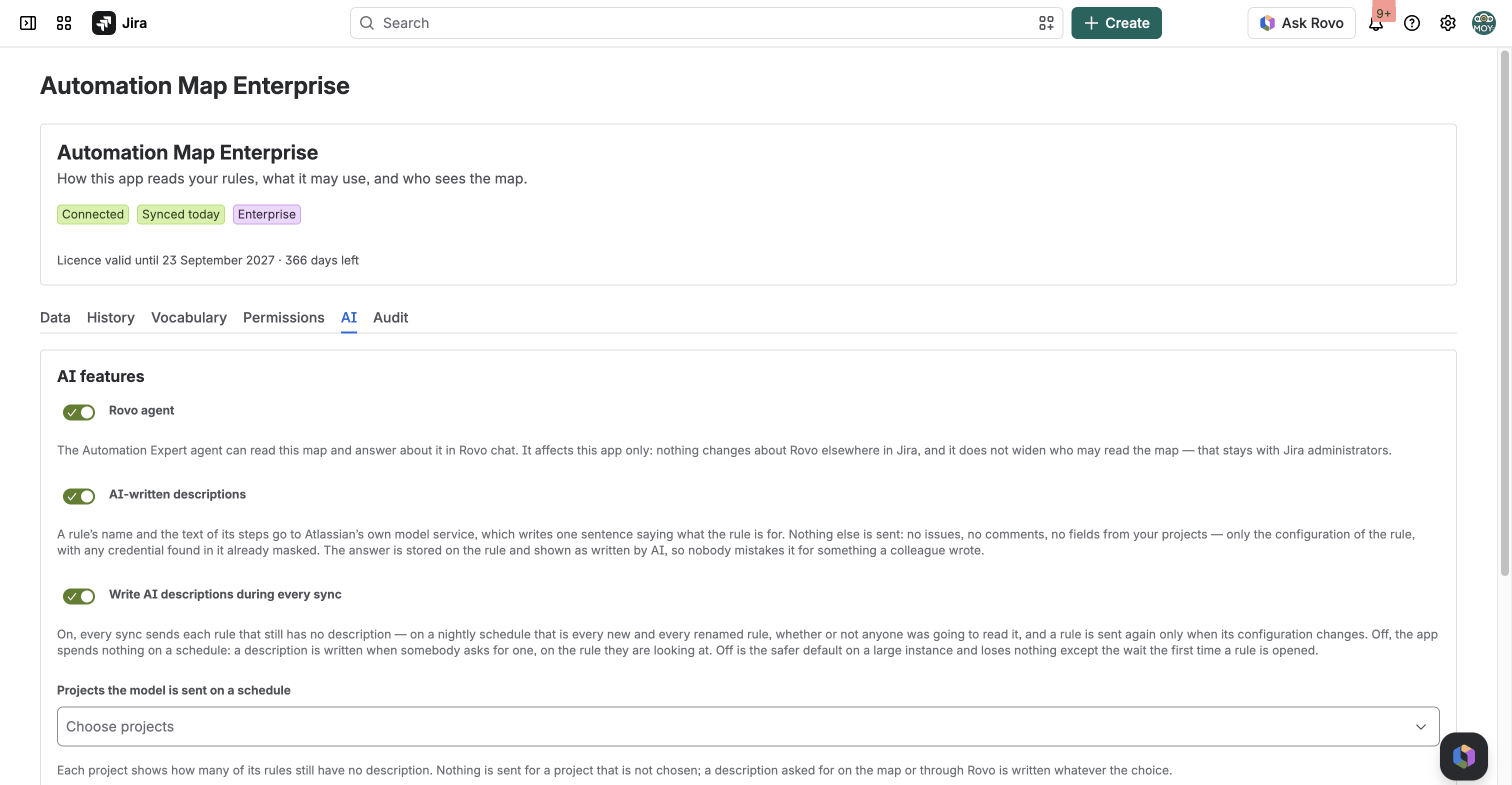
The AI tab after an administrator switched it on, shown on the Enterprise edition inside Jira’s settings. Every switch says in plain words what leaves the app and what does not.
Rule descriptions (Advanced and Enterprise)
One or two sentences per rule saying why the rule exists in business terms — not a re-reading of what its steps do, which you can already see.
Insights (Advanced and Enterprise)
The model's reading of a group of rules rather than one: a chain, a race on a single event, logic duplicated across projects. Each insight names the rules it is about.
The scope picker (Advanced and Enterprise)
The model only ever sees the projects an administrator ticks, and there is deliberately no “all projects” switch. The card prices the choice before it runs: how many rules, roughly how many minutes, and how much of this month's allowance it will spend — each installation has one, and the card says what is left.
What is sent, and what never is
Sent: The rule's name and the text of its steps, with anything that looks like a credential masked before it leaves.
Never sent: Never an issue, never a comment, never a field value out of one of your projects.
Atlassian-hosted Claude through Forge LLMs: Claude Haiku 4.5 writes the descriptions, Claude Opus 4.6 writes the insights. It does not leave Atlassian.
A human always wins
“The AI overwrote my description” cannot happen. A rule's purpose is taken in this order, and the first one that exists is the one you see:
- The description an administrator wrote on the rule itself, in Jira.
- A sentence a person wrote in the app.
- The model's sentence.
- The app's own generated line.
And it does not guess
A rule the model cannot confidently describe gets no description at all. Instead it gets a list of questions for whoever owns the rule — which is more useful than a confident sentence that is wrong, and a great deal safer.
Where this is the wrong answer
Sites with a handful of automation rules
If you can hold your automation in your head, a map of it is not worth paying for. The threshold is roughly the point where nobody on the team can any longer say what fires what.
Anyone wanting to know why a rule fired yesterday
That is Jira's own automation audit log, and it is the right tool for the question. This app reads the structure of the rules, not the log of their runs — Atlassian offers no API for the latter. It will answer with hypotheses from the structure and tell you to go and check the log.
Anyone wanting it to change Jira for them
It will tell you what to change and why — each finding names the step, the saving and the remedy, and the Rovo agent will walk you through it. What it will not do is make the edit. It has never written a rule, a field or a configuration, and the last click stays yours.
Jira Data Center or Server
Cloud only, every edition.
Teams wanting per-user automation analytics or run-volume dashboards
Not this product, and not something the available APIs would let it be.
Enterprise enquiry
Two questions only Enterprise answers — about fields, not rules
How do I know if a custom field already exists before creating another one?
The Enterprise edition keeps a catalogue of every custom field: its type, which projects it is already used in, and which same-named fields look abandoned. Jira records when a field's value last changed, so a field in no project that has never changed is somebody's first attempt.
Enterprise only. The Marketplace editions map automation rules; they do not carry the custom field catalogue.
Someone asked me to add a value to a field. Where do I actually add it?
Values belong to a context, not to a field — which is why "I added it and it didn't appear" is so common: a field with three contexts has three separate lists. The Enterprise edition names the contexts, says which projects each covers, links straight to the right one, and tells you whether the value is already there.
Including a value that merely looks identical — ACME typed in Cyrillic characters, for instance. This one is Enterprise only.
The Enterprise edition is distributed by a private installation link and sold directly, so there is a conversation before there is a licence. The number of automation rules on your site is the question that decides whether this is worth either of our time. The enquiry form on this page files a ticket in our service desk, which you are equally welcome to use directly.
Documentation · Support · Privacy Policy · Customer Terms · Data Security and Privacy Statement · Product Analytics
Last updated