Jira Automation Billing from December 2026 — What Counts as a Step
From 3 December 2026 Atlassian bills automation by the step. What a step is, what a failed run still costs, and how to measure your own rules (flows) before the date.
On 3 December 2026 Atlassian changes how Jira Automation is charged. Until now the limit was the number of rule executions; from that date it is the number of steps those executions spend, at $0.50 per 1,000 steps above the allowance included in your plans, pooled across your organisation. Most administrators know the date. Very few know what their own site currently spends, because Jira shows what the organisation has used in total, but not what one run of each rule (flow) costs.
This guide explains what counts as a step, what the change does to the rules you already have, and how to get a number for your own instance before the invoice does it for you.
What counts as a step
A step is a unit of work inside one run of a rule — Jira's editor now calls every block in a flow a step, and that block is the billing unit. The trigger counts. So does every condition, every action, every branch, and each turn of a loop that actually ran.
That last part is where estimates go wrong. A branch over ten issues that edits each one is not one step — it is at least the branch plus ten edits. A rule with a modest-looking configuration can be expensive simply because of what it iterates over.
A run that stops early still costs
The most counter-intuitive part: a run that fails a condition still pays for the steps it took to get there.
If a rule triggers, fetches the issue, evaluates two conditions and the second one says no, the run does nothing useful — and bills for the trigger, the fetch and both conditions. On a rule that fires often and passes rarely, almost the entire cost is spent on runs that produce no outcome.
This is why "how many rules do we have" is the wrong question and "what does one run of each cost" is the right one.
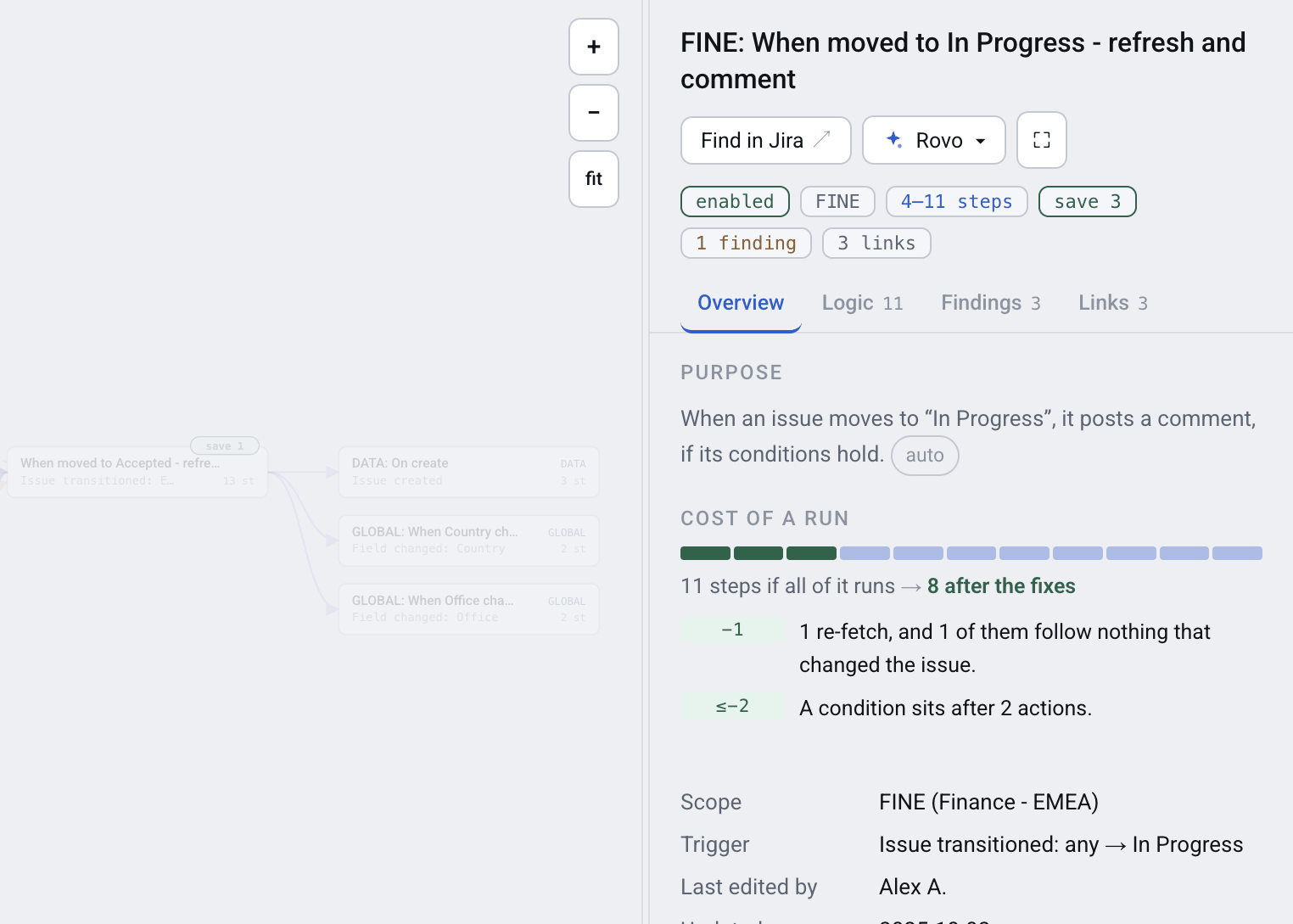
The cost of a run, and what could be removed from it
What this looks like on a real site
On one real Jira Cloud site — 1,214 rules across 98 projects, 884 of them switched on — one run of every enabled rule, if every step of it runs, comes to 5,443 steps (each branch counted once). Of those, up to 505 could go, across 225 rules — about one step in eleven.
One site is not an average. Yours will be different, and the useful part is not the total but the ratio: roughly six steps per enabled rule, one in eleven of them removable.
What nobody can tell you — including us
No app can predict your monthly bill. The bill is steps multiplied by how often each rule runs, and how often a rule runs is not in its configuration. It is in Jira's Performance insights (execution count per flow), and what one run did is in the audit log, kept for 90 days; there is no public API for the audit log, and this app reads neither.
What a structural tool can give you is the other half of the multiplication: the cost of one run of each rule, and which parts of that cost are waste. Combine it with what you know about your own traffic and you have an estimate. Anyone who offers you a forecast without the run counts is guessing.
How to measure your own site
- In Jira, open Jira settings → System → Automation flows, then More actions (…) → Export flows (Export rules on sites the rename has not reached).
- Load the file into Automation Map. A site of a thousand rules is mapped in a minute or two.
- Read the steps-per-run figure on each rule card, and the site-wide total above the map.
- Work down the rules by what they could save — thirteen detectors name the waste and, where it can be counted, how many steps each fix removes. The six most common are in six fixes for wasted steps.
NOTE: The site-wide list sorted by saving, with CSV export, is on the Advanced and Enterprise editions. The per-rule cost and its findings are on every edition, Basic included.
FAQ
When does Jira automation step billing start?
3 December 2026. From that date Atlassian charges by the step rather than by the rule execution, at $0.50 per 1,000 steps above the allowance included in your plans, pooled across your organisation.
What exactly counts as a step in a Jira automation flow?
The trigger, every condition, every action, every branch, and each turn of a loop that actually ran. A branch over ten issues that edits each one costs at least the branch plus ten edits, not one step.
Does a rule that stops at a failed condition still cost anything?
Yes. The steps taken before the condition failed are billed. A rule that fires often and passes rarely spends most of its cost on runs that do nothing.
How do I find out what my Jira automation costs per run?
Export the rules from Settings → System → Automation flows → Export flows and load the file into Automation Map. Each rule card shows the steps one run spends, as a range from the shortest path to the longest.
Can an app estimate my monthly automation bill?
No, and be sceptical of one that claims to. The bill needs how often each rule runs, which is not in the rule's configuration — that count is in Jira's Performance insights, not in any public API. The cost of one run can be measured; the frequency cannot.
Do I have to change my rules before December?
Nothing in the rules themselves changes. But on a Free plan, or a paid plan with extra usage switched off, automation stops once the monthly step allowance is used up; with extra usage on, it keeps running and the excess is billed. Either way the waste inside the rules starts to matter, so the value of removing it goes from tidiness to money.
Measure it before the invoice does
The date is fixed and the mechanics are published. The only variable is whether you find out what your site spends now, or in the first bill of December.