How to Reduce Jira Automation Step Usage — Six Fixes
A log action on every run. A re-fetch after nothing changed. A condition the trigger could have applied for free. Each one is cheap to remove from a rule (flow) and, from December, billed.
Most rules (Jira now calls them flows) that waste money are not badly designed. They were written quickly, debugged with a log action, extended twice, and never read again. The waste sits in the order of the steps, not in the intent.
From 3 December 2026 that waste appears on an invoice: Atlassian bills Jira automation by the step, at $0.50 per 1,000 steps above your organisation's allowance. This guide walks through six patterns that cost steps for no outcome, why each one happens, and what to do about it. On one real site, the app found 505 of 5,443 steps — about one in eleven, across 225 rules — that fixes like these could remove.
1. A log action that runs every time
Someone added Log action to see why a rule misbehaved, fixed it, and left the log in. It now runs on every execution, forever, and nobody reads the output.
Fix: delete it. If you want the trace kept for a genuinely tricky rule, move it behind the condition that actually distinguishes the interesting case, so it only runs on the path you care about.
2. A re-fetch when nothing changed
Re-fetch work item data exists for one reason: something outside the rule changed the work item and the rule needs the new values. If nothing between the trigger and the re-fetch touched the issue, the step buys nothing.
Fix: remove re-fetches that follow only steps that do not change the work item. Keep one right after Work item created if later steps read fields set during creation, and after a transition or an external call.
3. A condition the trigger could have applied for free
A rule triggers on Work item transitioned, then its first condition checks the new status is Done — the trigger's own To-status filter does that for free. Or a rule on Work item updated whose first condition checks one field — a Field value changed trigger on that field does the same.
A trigger that filters costs the same single step whether it matches or not, and the condition it replaces was a second step on every run.
Fix: move the filter into the trigger. The run ends at the trigger instead of at a paid condition.
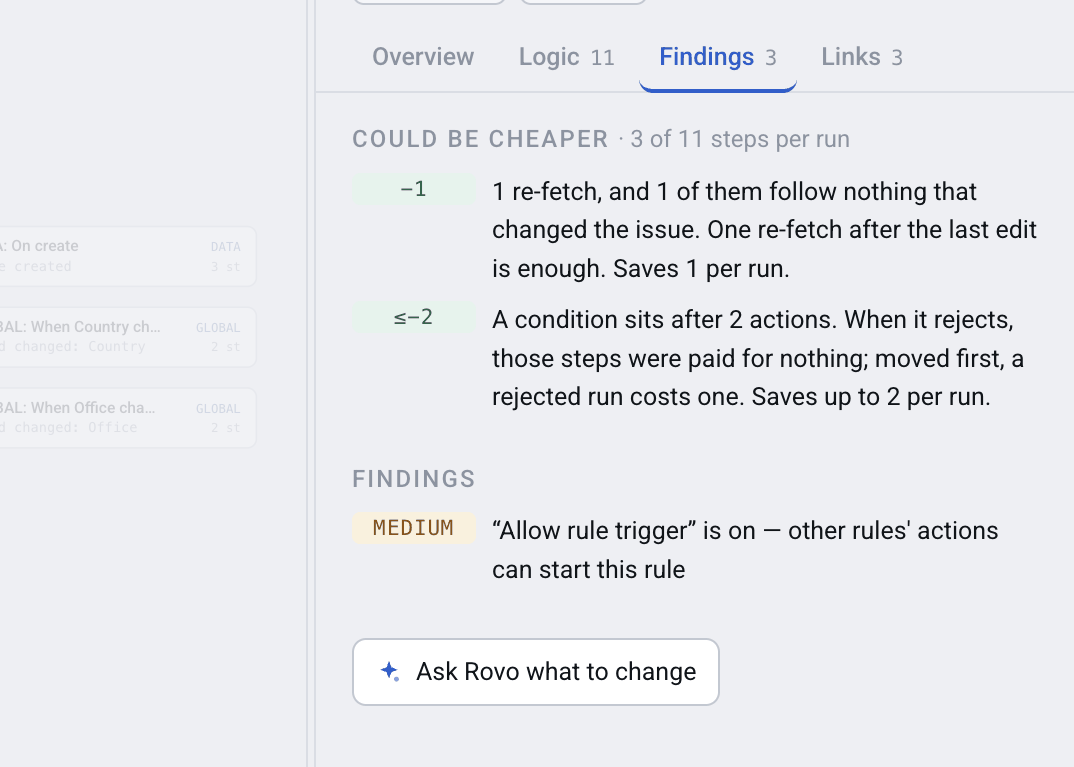
Cost findings say what to change and what it saves
4. Conditions placed after actions
A rule edits the issue, adds a comment, and then checks whether the issue is in the right status. When the check fails, the edit and the comment have already happened — you paid for them, and you may have to undo them.
Fix: every condition that does not depend on an action's result belongs above the first action. This is the one pattern on the list that is a correctness bug as well as a cost bug.
5. Consecutive edits of the same issue
Three Edit work item actions in a row, each setting one field, because they were added on three different days. One edit action can set all three fields.
Fix: merge them. Three steps become one, and the issue gets one update in its history instead of three — which also stops three separate change events waking up whatever listens to that project.
6. A schedule that rescans everything
A scheduled rule runs on a JQL that returns every issue in the project, then a condition inside the loop picks the handful that matter. A thousand issues become a thousand condition steps every night.
Fix: push the filter into the schedule's JQL, or tick Only include work items that have changed since the last time this flow executed — that is what the app's finding points at. The loop then iterates over the matches instead of over everything, and the cost drops to what the rule actually acts on.
The other seven
Automation Map checks thirteen patterns of this kind, not six. The rest are narrower: rules that do nothing but log, runs of conditions one JQL condition could replace, site-wide rules that only ever act in a few spaces (projects), schedules that fire a dozen or more times a day, branches used as yes/no checks, variables used once, and constant edits a post-function or field default could do. Each finding names the step and explains why it is removable; most say how many steps the fix saves.
NOTE: Every finding is a suggestion to review, not an automatic change. The app never edits your rules — it works from an export you upload and has no permission to change anything in Jira. You read the finding, decide, and make the change in Jira yourself.
What this is worth
On one real site, one run of every enabled rule came to about six steps per rule, and one in eleven of them could go. Multiply by how often your rules actually run — that count is in Jira's Performance insights, which no tool outside Jira reads — and you have the annual figure.
What you can get before December is the cost of one run, per rule, with the removable steps named.
FAQ
How do I find wasted steps in my Jira automation rules (flows)?
Export your rules from Settings → System → Automation flows → Export flows and load the file into Automation Map. Each rule card lists the steps one run spends and which of them thirteen detectors flag as removable.
Does removing these steps change what my rules do?
Not for the patterns above — a leftover log action, a redundant re-fetch or a merged pair of edits produce the same outcome more cheaply. The one exception is conditions placed after actions: fixing that changes behaviour, because the rule stops acting on work items it should never have touched.
Can the trigger do the filtering?
Often: a Work item transitioned trigger filters by From and To status, and Field value changed watches named fields. Either replaces a first condition and saves a step on every run.
How much can I expect to save?
On one real site with 884 enabled rules, up to 505 of 5,443 steps per full pass could be removed — about 9%, across 225 rules. One site is not an average; use the ratio as an order of magnitude, not a promise.
Will the app change my rules for me?
No. It works from an export you upload and has no permission to change anything in Jira. Findings are suggestions with the reasoning shown; you make the edit in Jira.
Why can't a tool tell me the money, only the steps?
Money is steps times frequency. Frequency lives in Jira's Performance insights (execution count per flow) and the audit log, neither of which has a public API, so no external tool reads them. The steps are in the rule's configuration and can be counted exactly.
Start with the expensive ones
You do not need to review a thousand rules. On Advanced, the Audit page sorts every rule by what its fixes would save.