How to Find Jira Automation Rules That Create Issues in Other Projects
A rule (flow) owned by one team creates issues (work items) in a project (space) that belongs to someone else. The receiving team usually finds out from the tickets.
Every large Jira site has this conversation: "who keeps creating these tickets in our backlog?" Nobody on the team did it. A rule did — a rule that lives in another project, was written by another team, and nobody on either side remembers it exists.
On one real Jira Cloud site of 1,214 rules across 98 projects, 95 rules (flows) are configured to create work items outside their own scope — 184 links in all, disabled rules included. That is not a fault; a service desk that opens a development ticket is doing exactly what it should. The problem is that the receiving team has no way to see it.
Why it is invisible from the receiving end
Jira's rule list is scoped by where a rule lives, not by where it acts. Open project B's automation settings and you see the rules owned by project B. A rule owned by project A that creates issues in B does not appear anywhere in that list, unless the rule's scope includes B.
So the team that gets the tickets cannot enumerate what creates work in their project, and the team that owns the rule has no reason to think about it. The dependency is real, load-bearing and undocumented.
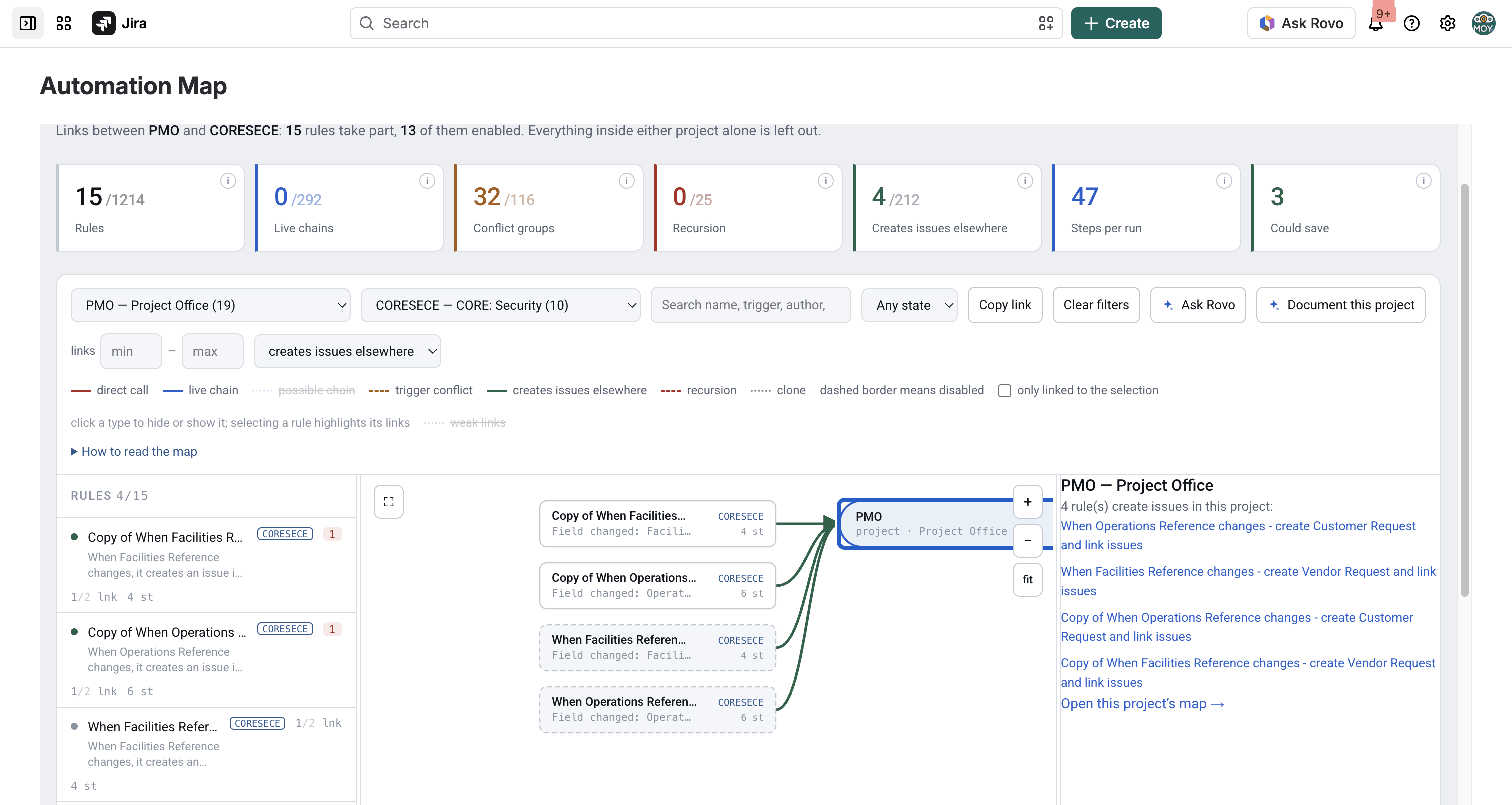
Pick a space and the rules from other spaces that create work items in it hang off its green node
The three shapes it takes
Creating issues. The most visible one — work appears in a backlog from outside. Usually intentional, occasionally a loop that nobody notices until the sprint board is full.
Setting fields. A rule reaches into another project's issues and writes a field. When that field also has an owner in the receiving project, you get two writers, and neither team knows about the other. This is the version that causes "the value keeps changing back".
Transitioning issues. A rule moves work through someone else's workflow. The receiving team's metrics change shape and nobody can explain why.
Automation Map lists the first shape — every rule that creates work items outside its own scope. Field edits and transitions that reach into another space (project) are not listed; for a field, ask the Rovo agent "who touches this field".
Why it matters more than it used to
Three reasons, one of them new:
- Team boundaries. Cross-project rules are how one team's automation becomes another team's incident. Being able to list them is the difference between a governance policy and a wish.
- Permissions. A rule runs as an account. When that account has rights across projects, the rule inherits them. Rules that create work in projects their owning team cannot otherwise touch are worth reviewing on their own.
- Cost. From December 2026 every step is billed — including those of rules in the receiving space that react to what the sending rule created, if they allow flow triggers. A cross-project rule can be the start of a chain nobody has ever seen end to end.
How to get the list
- Export the rules: Jira settings → System → Automation flows → More actions (…) → Export flows (Export rules on older sites).
- Load the file into Automation Map.
- Pick your space (project) on the map. Rules from other spaces that create work items in it attach to its green node; click the node for the list.
- To see everything that crosses between two teams, pick the second space under links with another project….
NOTE: The map shows what the configuration allows. For how often a rule ran, use Jira's Performance insights; for what one run did, its audit log (90 days). The app reads neither.
FAQ
How do I find rules that create issues in another Jira project?
Export your automation rules and look at where each rule creates work items rather than where the rule lives. Automation Map attaches those rules to the receiving project's node on the map, with the list behind it.
Why can't I see rules from other projects in my project's automation settings?
Because Jira scopes the rule list by ownership, not by effect. A rule owned by project A that creates issues in project B is listed only under A.
Is a cross-project rule (flow) a problem?
Usually not — plenty of them are deliberate integrations between teams. The problem is that the receiving team cannot enumerate them, so nobody reviews them and nobody knows what would break.
How does this relate to permissions?
A rule acts as an account, and inherits that account's rights. A rule that creates work in projects its owning team cannot reach manually is worth a separate look, because the automation is the only thing granting that reach.
Does this cost more under step billing?
It can. A work item created from outside is an event in the receiving project, which may wake rules there if they allow flow triggers. Those steps are billed too, and the chain crosses a team boundary where nobody is watching the whole of it.
Can I see how many issues a rule created?
Not from outside Jira. Run counts are in Jira's Performance insights and the audit log, neither of which has a public API. Structure is exact; volumes are Jira's.
Find out who creates work in your backlog
The rules crossing your project boundary already exist. The only question is whether you have a list of them.
👉 Automation Map for Jira — see which spaces create work items in yours