How to See What Depends on a Jira Automation Rule Before Disabling It
Jira shows a rule (flow) on its own. It never shows what depends on it. Here is how to see a rule's incoming and outgoing chains before you touch the toggle.
The question comes up every time someone opens the rule list: this one looks obsolete — what breaks if I turn it off? Nobody can answer it, so the rule stays on, and the list grows for another year.
The reason nobody can answer is structural. Jira's rule (flow) editor shows one rule at a time. It has no view of what happens after that rule's actions — which other rules wake up because this one edited an issue, transitioned it, or created something. That relationship exists in the data and is shown nowhere.
Two directions, two different risks
Outgoing. This rule's actions cause events. Other rules trigger on those events. Switch it off and they stop firing for the events this rule used to cause — silently, because nothing reports a rule that simply never runs.
Incoming. Other rules cause the events this one reacts to. If you disable one of those, this rule stops receiving those events. That is the same failure seen from the other end, and it is the more common surprise: the rule everyone was looking at was fine.
Both directions need to be visible before the toggle is safe to touch.
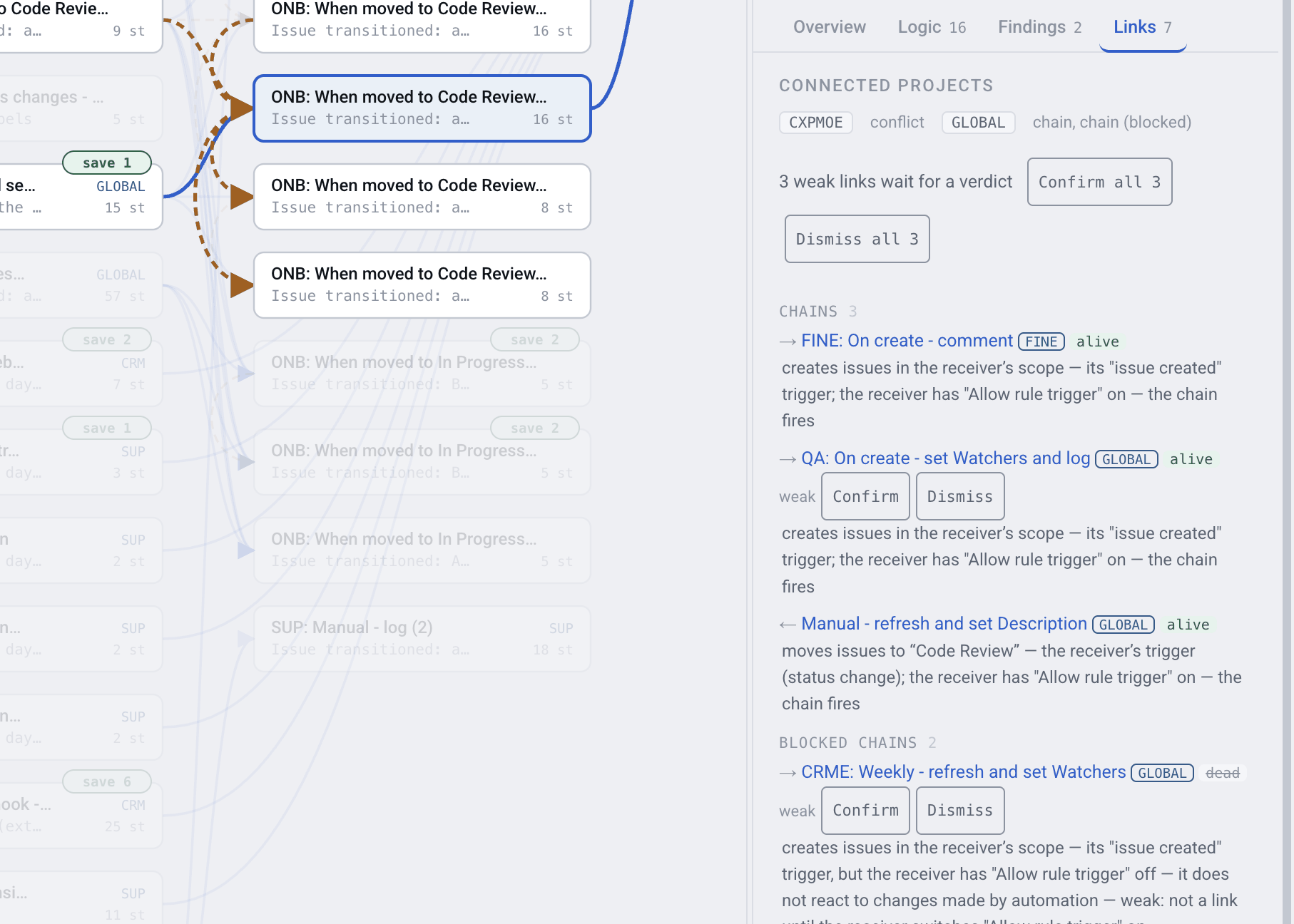
Incoming and outgoing chains for one rule
The switch that decides whether a chain exists
A chain from rule A to rule B only works if B has Allow flow trigger (Allow rule trigger on older sites) switched on. That setting sits in B's own settings, and it is off by default.
This is one of the most consequential settings in Jira automation, and it produces two opposite mistakes:
- A chain you think exists but does not. A fires, B was supposed to follow, B never had the switch on. Nothing errors.
- A chain you forgot exists. B does have the switch on, so disabling A quietly stops B, three teams away.
On one real site, 1,724 pairs of rules would chain if the receiving rule allowed it — most were never meant to. Nobody can tell which from inside Jira. On the same site, 293 chains do fire. The useful number is not either total; it is which of them touch the rule in front of you.
Rings
Chains can close. Rule A edits an issue, which wakes rule B, which transitions it, which wakes A again. On one real site there are 25 such recursions — 21 rules that trigger themselves and 4 rings across several rules.
Jira has a loop guard, so these usually stop rather than run away. But every turn of the loop is billed under step-based pricing from December 2026, and a ring is nearly impossible to spot by reading rules one at a time — you have to look at all of them at once.
How to check before you switch
- Export your rules: Jira settings → System → Automation flows → More actions (…) → Export flows (Export rules on older sites).
- Load the file into Automation Map.
- Open the rule you want to disable and read its Links tab: what triggers it, what it triggers, and which of those links are blocked by the
Allow flow triggerswitch. - Follow the chains one hop further if anything downstream looks load-bearing.
- Or ask the Rovo agent "what stops if I disable this rule?" — it lists only the links that actually fire, on every edition.
NOTE: The map shows what the configuration makes possible. It cannot say how often a chain actually fires: that is in Jira's Performance insights, and what one run did is in the audit log, kept for 90 days. The app reads neither.
FAQ
How do I know what depends on a Jira automation rule?
You need the rule's incoming and outgoing links — which rules trigger it, and which rules its actions wake up. Jira's editor shows neither; Automation Map builds both directions from the exported configuration.
What is the Allow flow trigger setting?
A switch in a flow's own settings (Allow rule trigger on older sites) that decides whether the rule may be triggered by another rule's actions. It is off by default, which is why chains people believe in often do not exist.
Why did my rule stop firing when a colleague disabled a different one?
Most likely because yours was downstream: the disabled rule produced the event yours triggered on, and yours allowed flow triggers. Nothing errors in that case — the rule just never receives that event, which is why it can go unnoticed for months.
Are 1,724 blocked pairs a problem?
Not in themselves. Most rules were never meant to chain, and the switch being off is correct for them. The problem is that from inside Jira you cannot tell which of them someone intended to be live.
How do I find recursive automation rules?
A recursion is a cycle in the trigger graph — a rule that eventually re-triggers itself. Finding one means looking at every rule at once, which is what the map does; reading rules individually will not surface it.
Can I see how often a chain actually fires?
Not from the map. How often a chain fires is in Jira's Performance insights, and what a run did is in the audit log (90 days); there is no public API for it. Structure is exact; frequency is Jira's.
Look before you toggle
Disabling a rule takes one click. Finding out what it fed can take a quarter, if the answer arrives as a complaint.