Jira Automation Rule Not Triggering? Three Causes Jira Does Not Report
No error, no failed run, nothing in the log — the rule (flow) simply never happened. Three causes Jira does not report, and how to find them.
Somebody reports that escalated tickets stopped paging the on-call engineer. You open the rule. It is enabled, its conditions look right, and the audit log shows nothing at all — not a failure, not a skipped run, nothing. The rule did not break. A Jira automation rule (Jira now calls them flows) stopped working in the only way Jira never tells you about: it was never asked to run.
There are three structural reasons this happens, and none of them produces an error. This guide explains each one, what it looks like from the outside, and how to find every instance on your own site.
The switch that ships switched off
A rule that reacts to a work item change — transitioned, field changed, commented — ignores changes made by other automation rules unless you tell it not to. The setting is called Allow flow trigger (Allow rule trigger on older sites), it sits in the flow's settings, and Jira ships it off.
That default is deliberate and sensible: without it, one careless rule could set off a cascade across a site. The cost is that the chain you designed on a whiteboard does not exist until somebody ticks a box in the receiving rule — and nothing anywhere reports that it is missing. The sending rule runs, does its work, and reports success. It did succeed. The second rule was simply never invited.
This is a common cause of a "broken" chain that was never broken.
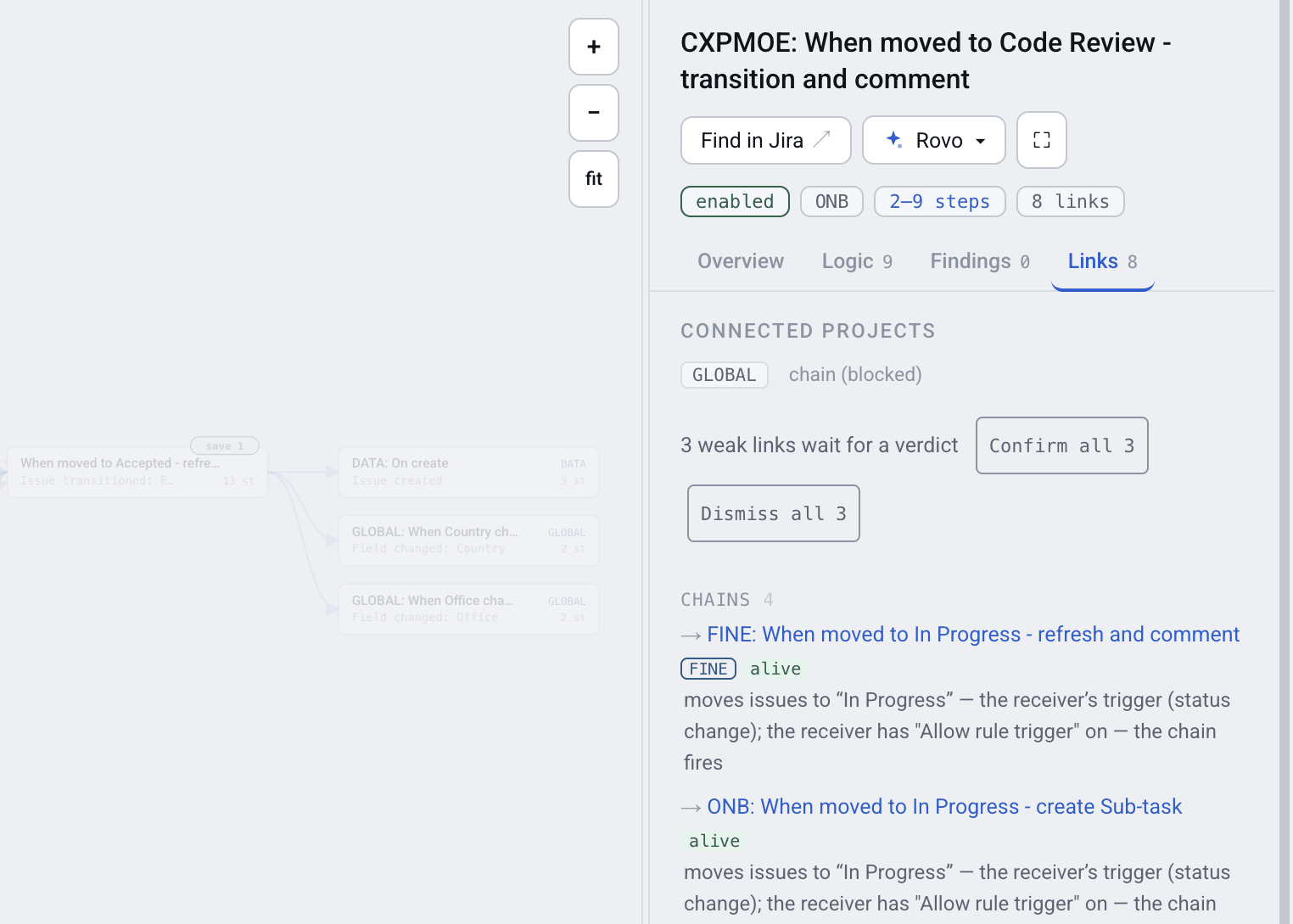
One rule's links: what fires, what cannot, and why
What that looks like at real-site scale
On one real Jira Cloud site — 1,214 rules across 98 projects, 884 of them switched on — Automation Map found 1,724 pairs of rules that could hand off to each other but never do, because the receiving rule has Allow flow trigger off. Those 1,724 possibilities land in 216 rules.
NOTE: That is not a count of broken chains, and we will not present it as one. The switch is off by default, so most of those pairs were never meant to chain at all — they are simply two rules that happen to touch the same event. The useful number is the handful inside it that somebody did build on purpose and that quietly never ran. Only a person who knows the intent can tell which is which, which is why the app names the switch instead of calling it a fault.
One site is not an average. Yours will produce different numbers, and the point of the figure is the ratio: the chains that actually fire on that site number 293, against 1,724 possibilities. Somewhere in that gap sit the hand-offs you meant to build.
When two rules answer the same event
The second cause looks like the opposite problem: something happens twice. An issue gets two comments. A field is set and immediately overwritten. A ticket transitions and bounces back.
When two or more rules listen to the same event in the same project, Jira does not guarantee which runs first, and it does not warn you that they overlap. Both rules are correct in isolation. Together they race, and the winner changes from run to run — which is why the problem is so hard to reproduce and so easy to blame on the wrong rule.
The same site carries 116 groups of rules racing on one event.
When a rule wakes itself up
The third cause is a rule whose own action matches its own trigger. It edits a work item; the edit is a change; the change sets the rule off again — provided the rule accepts triggers from automation, the same switch as in the first cause. Jira has loop protection and will stop a runaway, but a slow loop — one that fires a few times per issue rather than forever — just quietly costs you steps and writes noise into the history.
Rings are the same thing spread across several rules: A sets off B, B sets off C, C sets off A. On that same site there are 25 recursions — 21 rules that loop into themselves and 4 rings running through more than one rule.
How to find yours
The three causes have one thing in common: they are all visible in the configuration of your rules, not in the log of their runs. That means you can find them without waiting for the problem to happen again.
- In Jira, open Jira settings → System → Automation flows, then More actions (…) → Export flows (Export rules on sites the rename has not reached). Jira downloads one JSON file holding every rule on the site.
- Upload that file to Automation Map. The map is built in the background; a site of a thousand rules takes a minute or two.
- Open the rule you suspect and read its Links tab: chains that fire, chains that cannot, and the reason for each. Confirm the links that were built on purpose and dismiss the rest.
- For the site-wide view, read the counters above the map — Live chains, Conflict groups, Recursion — then pick that link type in the Any link filter to see the rules involved.
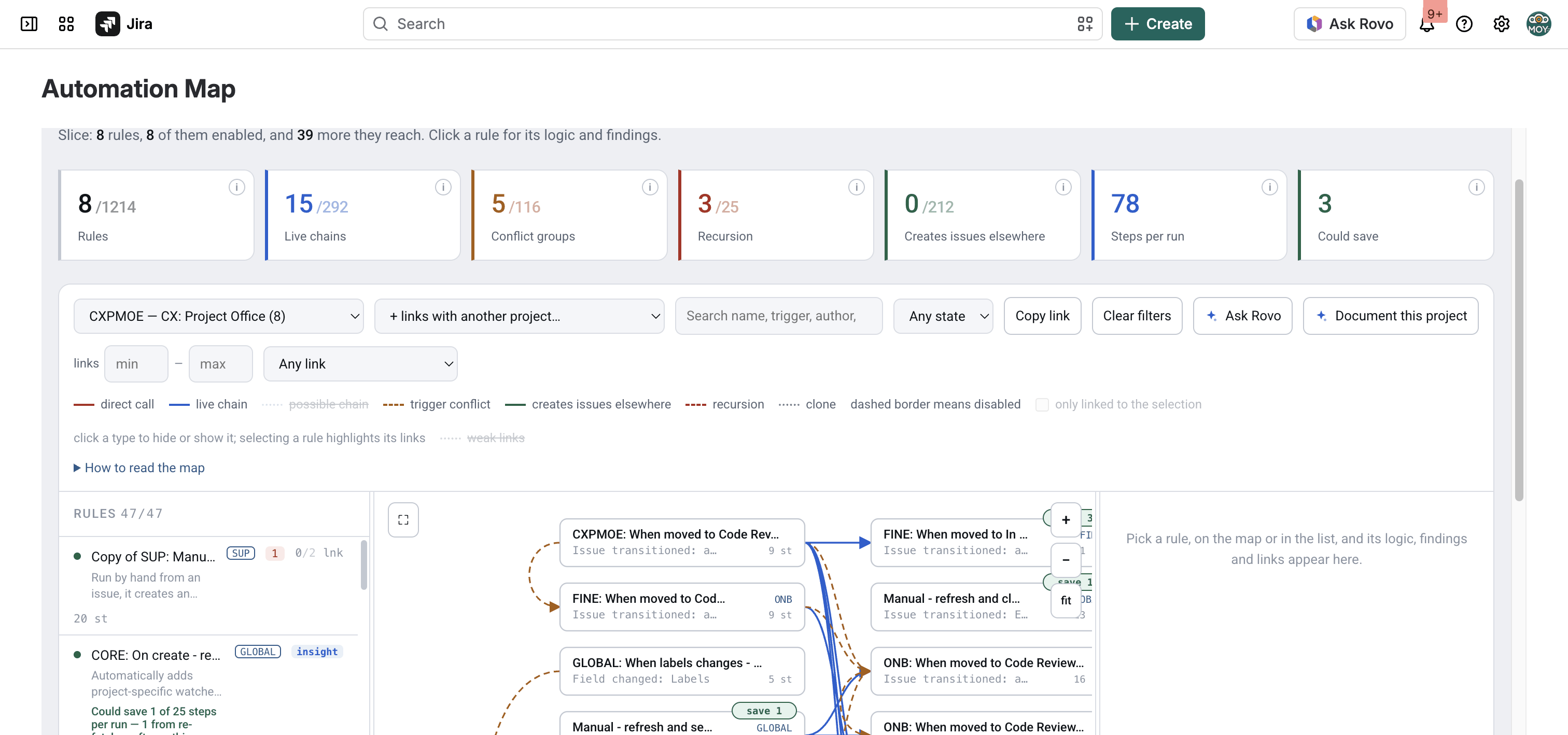
The map of one project, with a counter for each cause
Nothing in that sequence changes anything in Jira. The app reads the export and reports; when you decide a chain was meant to exist, you tick Allow flow trigger yourself, in Jira.
What this cannot tell you
It cannot tell you whether a rule ran yesterday. How often a rule runs is in Jira's Performance insights; what one run did is in the automation audit log, kept for 90 days. The app reads neither, and there is no public API for the audit log. What the structure gives you is the shortlist: which rules could have done the thing, and which of them cannot have, because the chain they sit in cannot fire.
For "did it actually run, and what did it do", the right tool is Jira's own automation audit log, and it is better at that than anything we could build.
FAQ
Why did my Jira automation rule stop working with no error?
Often it never ran. A rule that reacts to work item changes ignores changes made by other rules unless Allow flow trigger (Allow rule trigger on older sites) is on in the receiving rule, and Jira ships that switch off. The sending rule succeeds, the receiving one is never invited, and nothing is logged as a failure.
What does Allow flow trigger actually do?
It lets a rule react to changes made by automation rather than only to changes made by people. Without it, a transition performed by another rule looks to the receiving rule like nothing happened at all.
How do I find every blocked hand-off on my site?
Export the rules from Settings → System → Automation flows → Export flows and load the file into Automation Map. Each rule's Links tab separates the chains that fire from the ones that cannot and names the switch responsible.
Why does my Jira automation run twice?
Two or more rules are listening to the same event in the same place. Jira does not guarantee which runs first and does not warn that they overlap, so the outcome changes between runs — the usual cause of double comments and fields that get overwritten.
How do I stop a Jira automation rule from triggering itself?
Unless it must react to other rules, leave Allow flow trigger off. Otherwise narrow the trigger so the rule's own action does not match it — trigger on a specific field rather than any update, or add a condition that excludes the state the rule itself produces. Jira's loop protection stops a runaway, but a slow loop just costs steps quietly.
Can an app tell me why a rule fired yesterday?
No. How often a rule ran is in Jira's Performance insights, and what one run did is in the audit log, kept for 90 days — there is no public API for it, so no app outside Jira reads it. A structural map narrows it to the rules that could have been responsible; the audit log confirms which one was.
Does reading my rules change anything in Jira?
No. Automation Map reads an export and reports on it. Every fix it names — switching Allow flow trigger on, narrowing a trigger, removing a racing rule — is one you make yourself in Jira.
Find the chains that never fire
The rules you built are not lost. They are sitting in a site where nothing reports which of the hand-offs you meant to build can never fire, and one export is enough to see which.