Shift Deadlines by Time Spent Blocked — Jira Automation Guide
Pause the clock on blocked Jira issues — two Automation rules store the pause in an issue property and push the due date forward in business days.
An issue sits in Blocked for a week, comes back to In Progress — and immediately shows up as overdue, because its Planned End Date never moved. Someone fixes the date by hand. Next sprint, same story.
This guide builds the fix with two small Jira Automation rules: when a work item leaves Blocked, its deadline shifts forward by exactly the time it spent there — counted in business days, with no helper custom field and no external scripts. The trick is a hidden Jira feature called issue entity properties.
What we're building
- When a work item enters Blocked or Hold, remember the date.
- When it leaves, push Planned End Date forward by the pause length.
- Weekends don't count — the shift is in business days.
- If the deadline field is empty, do nothing.
- Chained pauses (Blocked → Hold) just work: both rules fire on the transition.
Three ways to measure time in a status
| Approach | Does it work in a rule? | The catch |
|---|---|---|
| Read the changelog | ❌ | {{issue.changelog}} comes back empty inside Automation (histories=null, total=0) — status history isn't available to rules. |
| Helper custom field | ✅ | Adds a permanent field to screens, exports and the search index — visible clutter for data no human needs. |
| Issue entity property | ✅ | Invisible metadata on the work item: no field, no screen config, nothing indexed. The only gap — Jira ships no UI to look at properties (solved below). |
Entity properties win: they're exactly the "sticky note on the issue" this job needs.
Rule 1 — remember when the pause started
Trigger: Work item transitioned → to Blocked, Hold. Then:
- Create variable
time={{now.toDays}} - Set entity property on the Issue: key
pause_start, value{{time}}
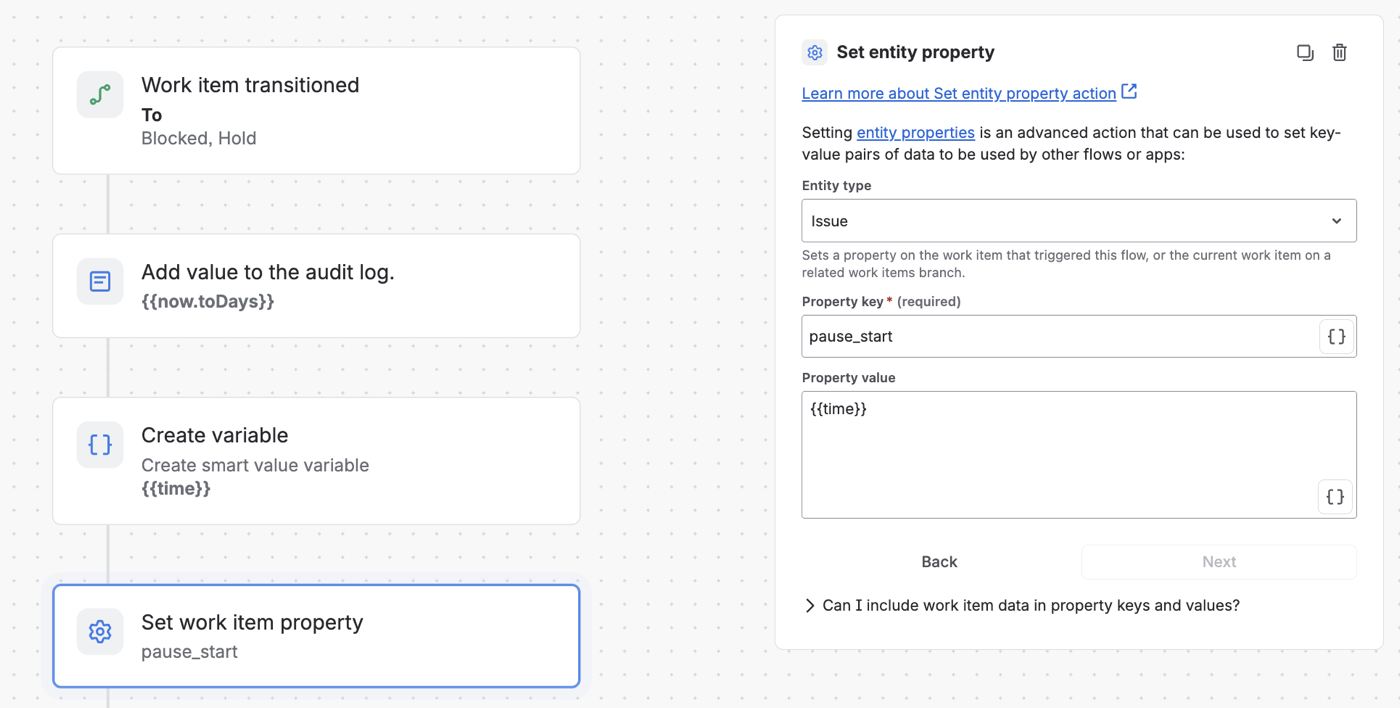
Rule 1 — the pause date lands in an invisible issue property
{{now.toDays}} is the number of days since the epoch — a plain integer like 20643. That choice matters; see "Why an integer" below.
Rule 2 — shift the deadline on the way out
Trigger: Work item transitioned → from Blocked, Hold. Condition: Planned end date is not empty. Then create a variable formula:
{{issue.customfield_10236.plusBusinessDays(issue.customfield_10236.diff(issue.customfield_10236.plusDays(now.toDays.minus(issue.properties.pause_start))).businessDays)}}
…and Edit work item fields → set Planned end date to {{formula}}.
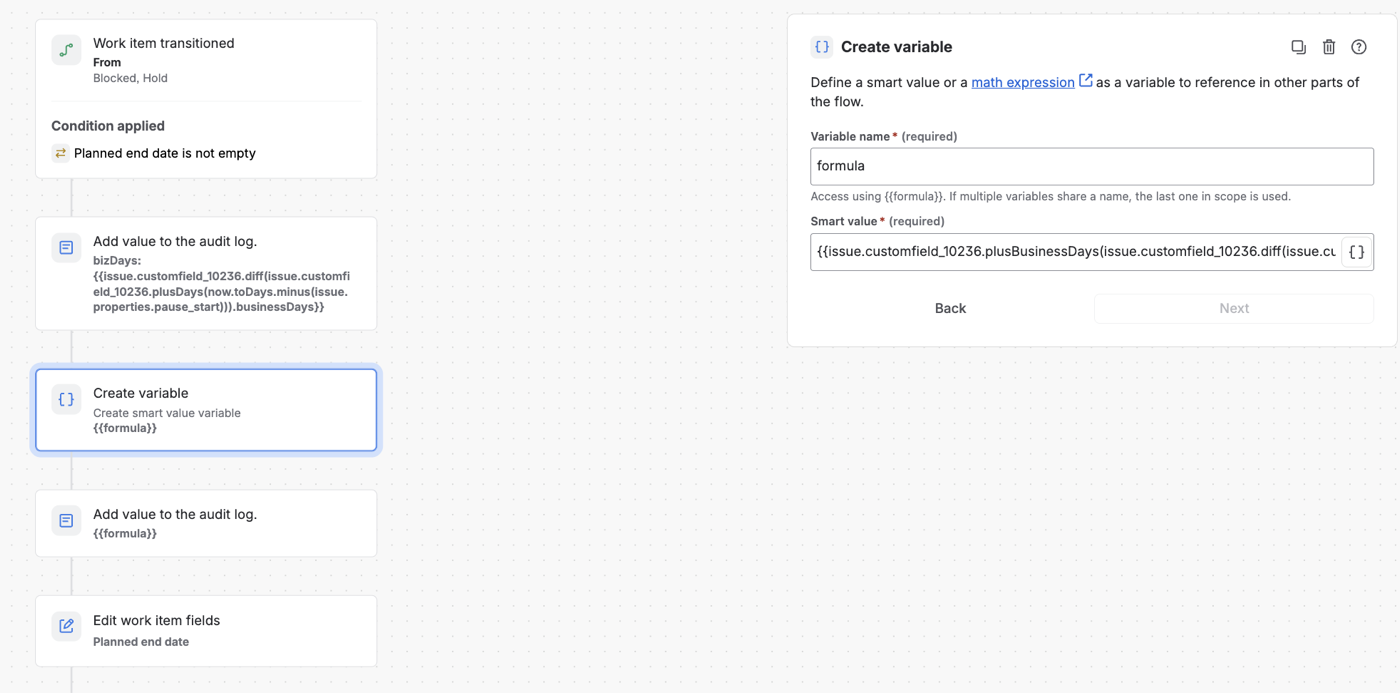
Rule 2 — condition, formula variable, field edit
Reading the formula inside-out:
now.toDays.minus(issue.properties.pause_start)— calendar days the item was paused.issue.customfield_10236.plusDays(…)— a helper date: the current deadline plus that calendar span..diff(…).businessDays— business days between the deadline and the helper date..diff()is happy comparing two dates — this two-step detour is what makes business-day math possible at all..plusBusinessDays(…)— the actual shift.
NOTE:
customfield_10236is the Planned end date field in this instance — look up your own field ID under Settings → Issues → Custom fields, or use the smart-value name if your field supports it.
One subtlety worth knowing: the formula counts business days across the shift window from the current deadline, not inside the pause itself. For rescheduling that's the right question — what matters is how many weekends the deadline jumps over.
A week in Blocked → the deadline moves five business days. No cleanup rule needed: the next pause simply overwrites pause_start.
Why an integer, not a date string
Automation can write a formatted date into a property, but it can't reliably parse one back — .diff() against a stored date string fails silently. Integer day-math (toDays, .minus(), .plusDays()) survives the round-trip every time. When a property has to be read back by a rule, store numbers.
Seeing what a rule actually stored
Entity properties have one real drawback: Jira has no screen that shows them. While wiring rules like these you constantly want answers to small questions — did Rule 1 fire? Is pause_start a number or a string? What happens if I backdate it a few days to simulate a long pause? The stock options are the REST API from Postman (blocked on many corporate networks) or throwaway automation rules that log values.
Universal Properties Editor for Jira (UPEJ) closes that gap with an admin page for exactly this: open the Issue properties tab, enter the key, and every property on the work item is visible and editable in place — including pause_start between test transitions. Backdating a pause becomes a ten-second edit instead of another debug rule.
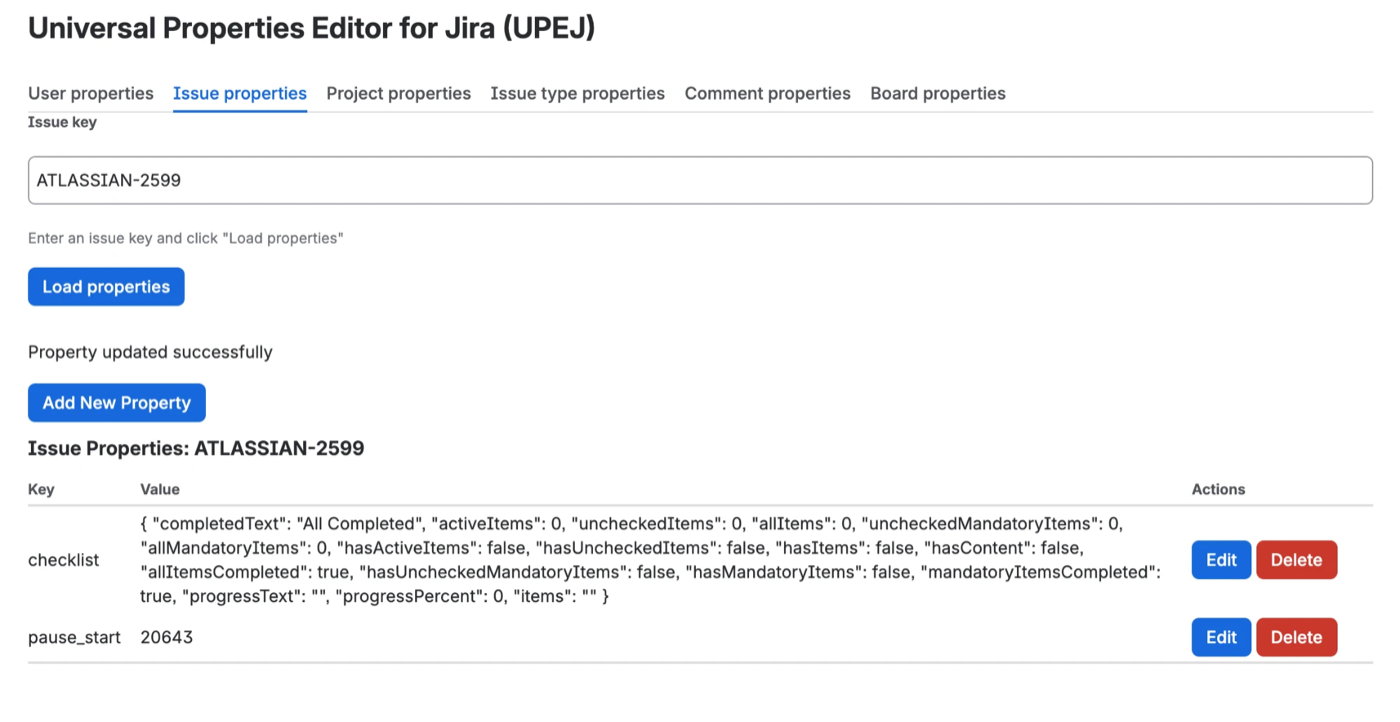
Every property on the work item — visible, editable, deletable
The two rules run fine without any app. Building on properties without a way to see them is where the pain lives.
FAQ
Why is the changelog empty in Jira Automation rules?
Inside a rule, {{issue.changelog}} returns an empty object (histories=null, total=0) — Automation doesn't expose status history to smart values. To measure time between transitions you have to record a timestamp yourself, in an entity property or a field.
What are Jira issue entity properties?
Hidden key-value metadata that Jira stores on work items (and users, projects, comments, boards). Rules, integrations and apps use them to keep state without adding visible fields. They don't appear on screens or in exports — and Jira ships no UI for them, which is what tools like UPEJ add.
Why store the date as a number instead of a date string?
A date string written into a property can't be parsed back by .diff() — the comparison fails silently. An integer like {{now.toDays}} (days since the epoch) round-trips reliably: subtract, add, compare with plain math.
Does the shift respect weekends?
Yes. The formula builds a helper date, takes .diff(…).businessDays against the current deadline, then applies .plusBusinessDays() — so a seven-calendar-day pause moves the deadline by five business days.
What if a work item goes Blocked → Hold → In Progress?
Both rules fire on the Blocked → Hold transition: the leave-rule shifts the deadline for the first pause, the enter-rule immediately records the start of the second one. Each pause is accounted for; pause_start is simply overwritten every time a new pause begins.
How do I check or change a property without the REST API?
Open the Issue properties tab in Universal Properties Editor for Jira, enter the work item key and load — every property is listed with edit and delete actions. Handy for verifying what a rule stored, or backdating a value while testing.
Look inside your properties
These two rules are copy-paste-able as is — the only thing Jira won't give you is a window into the properties they write. Universal Properties Editor for Jira is that window: issue, user, project, comment and board properties, viewable and editable from an admin page.