ISO 27001 Asset Inventory (A.5.9) in Jira — Practical Guide
Control A.5.9 wants a maintained inventory of assets with owners. Here's how to build and evidence it inside Jira instead of a spreadsheet.
ISO 27001 · A.5.9 — "Inventory of information and associated assets" sounds simple: keep a list of your assets and who owns them. In an audit it's rarely that simple, because the auditor doesn't want a list — they want proof the list is accurate, owned, and maintained. If your inventory is an Excel export, that's exactly where it struggles.
This guide shows how to build an ISO 27001 asset inventory in Jira, what A.5.9 evidence looks like, and how to keep it audit-ready without a spreadsheet reconciliation loop.
NOTE: Scannix helps you evidence A.5.9. It does not certify you or "make you ISO 27001 compliant" — certification comes from your auditor and your full ISMS.
What A.5.9 actually asks for
Reading the control the way an auditor does, you need to show:
- An inventory of assets (hardware, and the information they hold).
- An owner assigned to each asset.
- That the inventory is accurate and maintained — reviewed on a defined cadence.
- Evidence of that maintenance — not just the current state, but proof it's kept up.
The gap for most teams is the last two. A one-time spreadsheet can list assets and owners; it can't prove ongoing verification. The same inventory, by the way, doubles as evidence for GDPR Article 32 — one control, two frameworks.
Why Jira is the right home for it
If you run Jira Service Management with Assets, your CMDB already models assets, owners, and relationships. Keeping the inventory there means one source of truth — no export drifting away from reality the moment it's created. What Jira doesn't do out of the box is physical verification: confirming the asset in the CMDB actually exists on the floor. That's the piece to add.
Building and evidencing it with Scannix
Scannix turns your Jira Assets data into a repeatable A.5.9 workflow:
- Plan — create an audit and scope it by schema, object type, or AQL (e.g. all laptops in a location).
- Assign — each auditor sees only their own audits, so a multi-site review stays organized.
- Scan — verify assets with QR/barcode using the free iPhone app; works offline, blocks duplicate scans.
- Report — see scanned vs. missing live, with per-user timestamps and CSV export.
- Act — link the audit to Jira issues and follow up on missing assets through normal workflows.
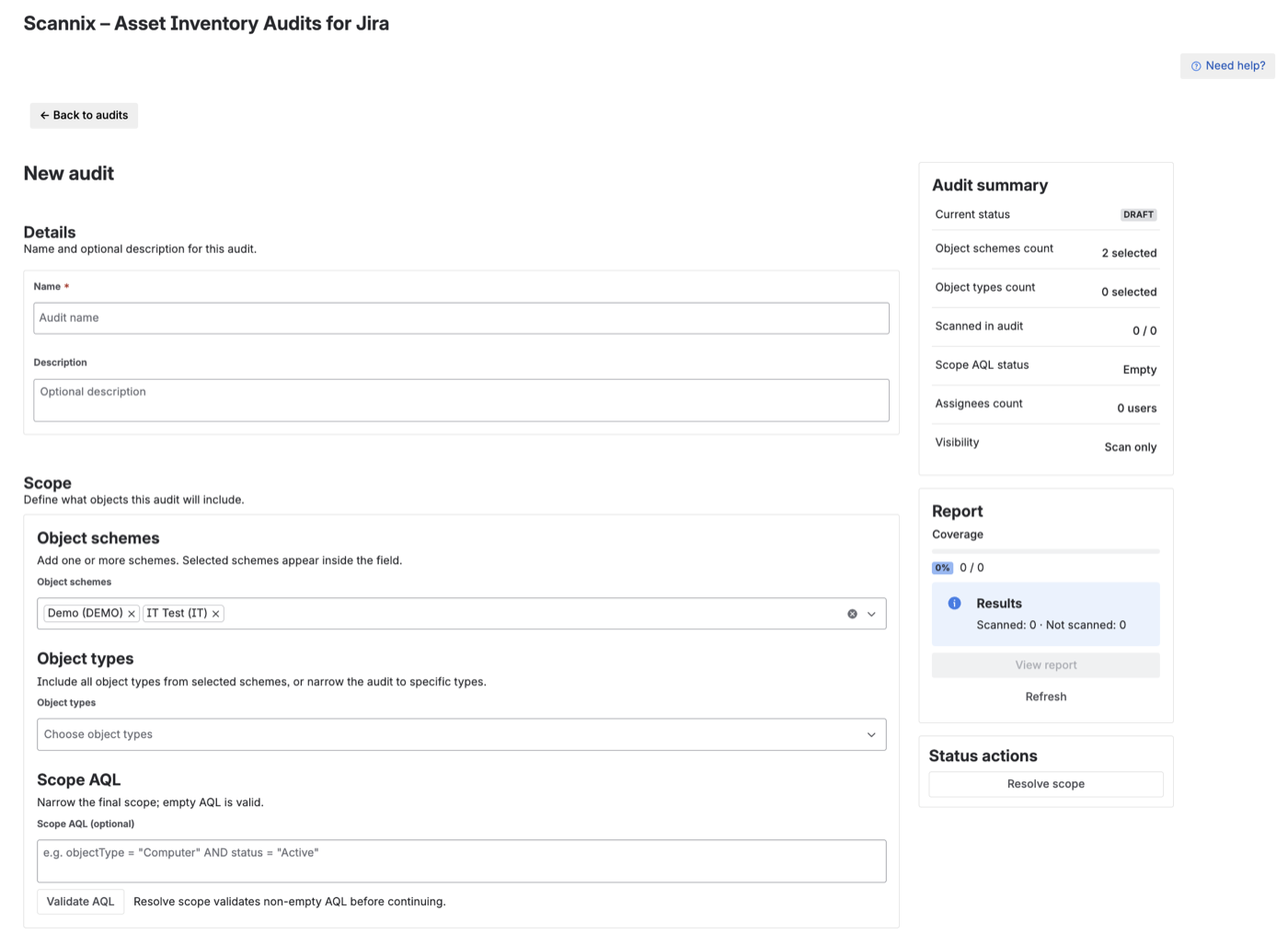
Scope an audit by schema, object type, or AQL
The output — timestamped, per-user, exportable — is the maintenance evidence A.5.9 reviewers look for. (New to the workflow? Start with the step-by-step audit guide.)
Keep it "maintained," automatically
A.5.9 hinges on the word maintained. Manually re-running inventory every quarter is where programs slip. Jira Automation can open, start, and close audits on schedule, so verification happens on cadence and each run self-documents. You get a trail of dated audit cycles instead of a single stale list — the same period-covering evidence a SOC 2 Type II audit expects.
FAQ
Does A.5.9 require physical scanning?
The control requires a maintained, owned inventory — it doesn't mandate a method. Physical verification by scanning is a practical way to prove the inventory is accurate, which is what auditors probe.
Can I reuse my existing barcodes with Scannix?
Yes. Scannix reads the QR codes and barcodes already on your assets — no relabeling project and no predefined-barcode setup.
What does the auditor get from this?
An exportable record showing each asset, its owner, and who verified it and when — plus a history of scheduled audit cycles that demonstrates the inventory is maintained.
Does Scannix work offline in server rooms and warehouses?
Yes. You can scan offline and sync to Jira once you're back online, which matters where there's no reliable Wi-Fi.
Where does Scannix keep the data?
In your Atlassian site. Scannix runs on Atlassian Forge, so nothing is copied to an external server.
How do I keep the inventory "maintained" for A.5.9?
Schedule verification with Jira Automation: audits open, start and close on a fixed cadence, and each cycle leaves a dated record — a trail that shows the inventory is kept up, not rebuilt before the audit.
How do I scope an audit to a single office or location?
Use an AQL filter when creating the audit — for example objectType = "Laptop" AND "Location" = "Berlin Office" — or save a per-location template and reuse it.
Make A.5.9 a workflow, not a spreadsheet
Your ISO 27001 asset inventory shouldn't be a document you rebuild before every audit. Run it as a repeatable, scheduled workflow in Jira and export the evidence when the auditor asks.